
dMAT 2026 Registration Ends September 15: Last Date, Exam Date, and How to Apply
 Talk to Expert
dMAT Registration has started for applicants planning to study in Germany for the Summer 2027 intake. Candidates must register online through the official Digitaler Master Test portal, choose a test centre, book an exam slot, upload documents, and pay the exam fee.

The dMAT Registration 2026 process is an important step for students applying to selected Germany master's programmes. Candidates willing to study in Germany and APS is required for their course can fill the dMAT application form. The registration for dMAT exam can be done on the official website, www.d-mat.de/en/dmat-in-india.
Indian students should complete the dMAT registration on or before September 15, 2026. The registration process is conducted entirely online through the official dMAT portal. Candidates need to create an account, choose their exam location, select a test centre, upload the required documents, and complete the payment. Since the test is linked with the APS Certificate process for certain applicants, understanding each registration step is important to avoid mistakes that may delay the admission process.
The dMAT exam date in India is September 26, and the result for the same will be declared on October 12, 2026. The Digital Master Test (dMAT) is a computer-based aptitude test that is gradually becoming a key admission requirement for several top universities in Germany. This article explains everything about dMAT Registration 2026, including the expected registration dates, eligibility, documents required, registration fee, exam centres, and the complete step-by-step application process.
- dMAT Registration 2026 Important Dates
- Who Should Register for dMAT 2026?
- Documents Required for dMAT Registration 2026
- Things to Know Before Starting dMAT Registration
- How to Register for the dMAT Exam: Step-by-Step Guide for Indian Students
- dMAT Registration Fee 2026
- Why Is There No Subject Module Option During dMAT Registration?
- What is dMAT Deregistration and How to Do It?
- dMAT Registration FAQs

dMAT Registration 2026 Important Dates
Candidates should complete the registration before the last date to avoid missing their preferred exam slot. Based on the latest official schedule, the following dates are important for students planning to appear for the upcoming dMAT exam.
| Event |
Date |
|---|---|
| dMAT Registration Starts |
June 29, 2026 |
| Last Date to Register for the dMAT Exam |
September 15, 2026 |
| dMAT Exam Date |
September 26, 2026 |
| Result Declaration |
October 12, 2026 |
Note: Candidates applying for Germany Summer Intake 2027 should regularly check the official dMAT portal, as the registration schedule may be updated.
Who Should Register for dMAT 2026?
The dMAT exam is intended for students applying to selected master's programmes offered by participating German universities. As more universities adopt the test, applicants should carefully check the admission requirements before submitting their applications. Students should register for the dMAT if they are:
- Applying for selected master's programmes in Germany.
- Planning admission for the Summer 2027 intake or later.
- Applying to programmes that require the dMAT score as part of the admission process.
- Required to submit a dMAT score during the APS Certificate process, where applicable.
Students are advised to verify the admission requirements on their chosen university's website before registering for the exam.
Documents Required for dMAT Registration 2026
Before beginning the online application, candidates should keep all the required documents ready. Having these documents prepared in advance helps complete the registration smoothly without interruptions. The following documents and information are required during dMAT Registration 2026:
- Valid passport or Identity Card
- Recent passport-size photograph
- Active email address
- Mobile number
- Date of birth details
- Residential address
- Nationality details
- Preferred test centre
- Valid debit card, credit card, PayPal, or other supported payment method
Important: Candidates must enter their passport or identity document details exactly as mentioned on the official document. Incorrect information may lead to identity verification issues on the dMAT exam day.
Things to Know Before Starting dMAT Registration
Candidates should read the registration instructions carefully before creating their account. A few simple checks can help avoid common mistakes and ensure a smooth application process.
- Use a valid and regularly accessible email address.
- Select the correct country and nationality during registration.
- Choose the nearest available test centre.
- Verify all personal details before final submission.
- Keep your passport ready while filling the application form.
- Complete the payment immediately after reviewing your application.
Once these preparations are complete, candidates can begin the online registration through the official dMAT portal. The complete step-by-step registration process is explained in the next section.
How to Register for the dMAT Exam: Step-by-Step Guide for Indian Students
Registering for the dMAT is done fully online through the official test portal, and the process includes creating an account, choosing a test centre and slot, uploading identity documents, and paying the exam fee. The steps below walk through the full registration process with screenshots, so students know exactly what to expect on each page before they begin.
Step 1: Access the Portal
Search for the "Digitaler Master Test" registration portal on Google and open the official website from the search results. The site loads in German by default, so students can use the browser's built-in translate option to switch the page to English before continuing.
Step 2: Begin Registration
On the homepage, click "Registration" from the top menu. This opens a short section explaining the process, where students then click the arrow button to start the registration for the exam. The official application portal for dMAT registration in India is www.gast.de/portal/center-search/center-search/dmat/exams/worldwide
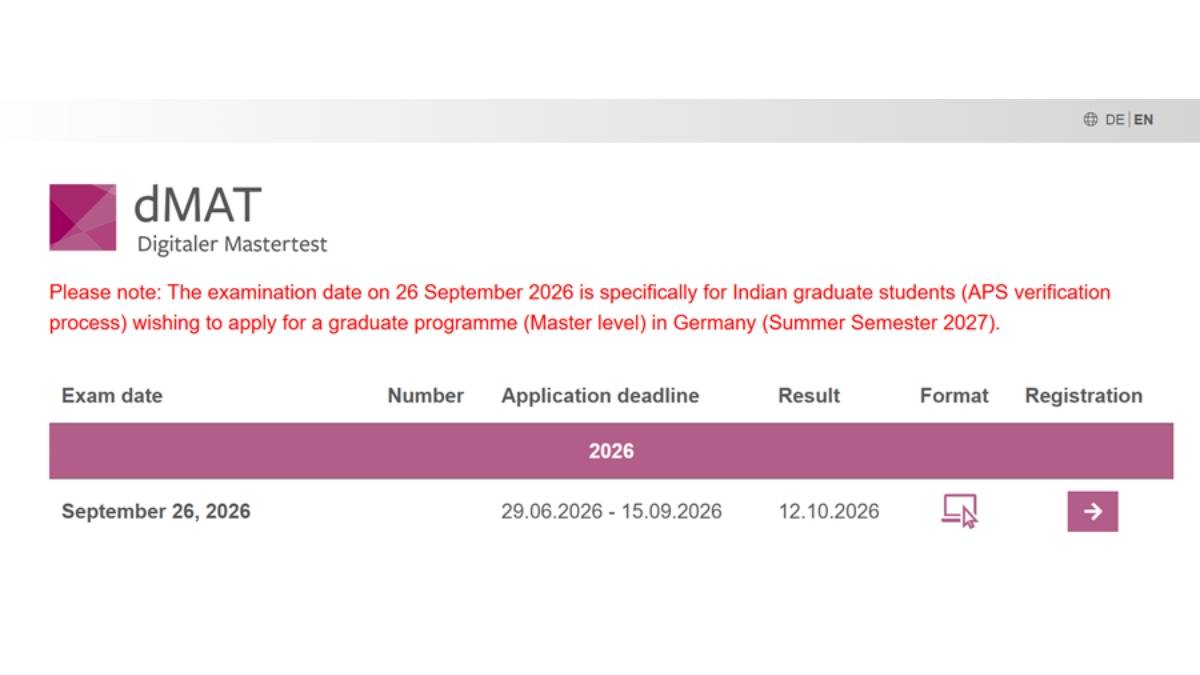
dMAT registration homepage
Step 3: Choose the Test Location
Select "Germany" if the test will be taken while already in the country, or select "Worldwide" if the exam will be taken from outside Germany, such as from India.
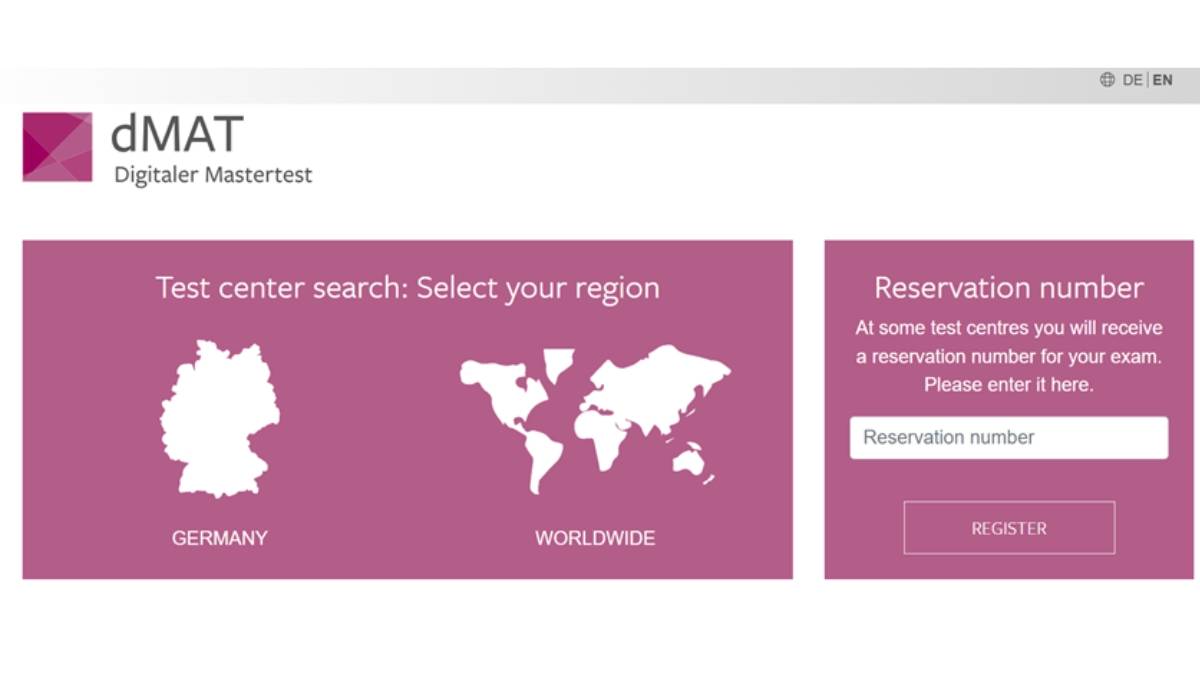
dMAT test location
Step 4: Select the Module and Nationality
Choose the General Academic Module, which is currently the only module available on the portal. After that, select the correct nationality from the dropdown list, for example, India.
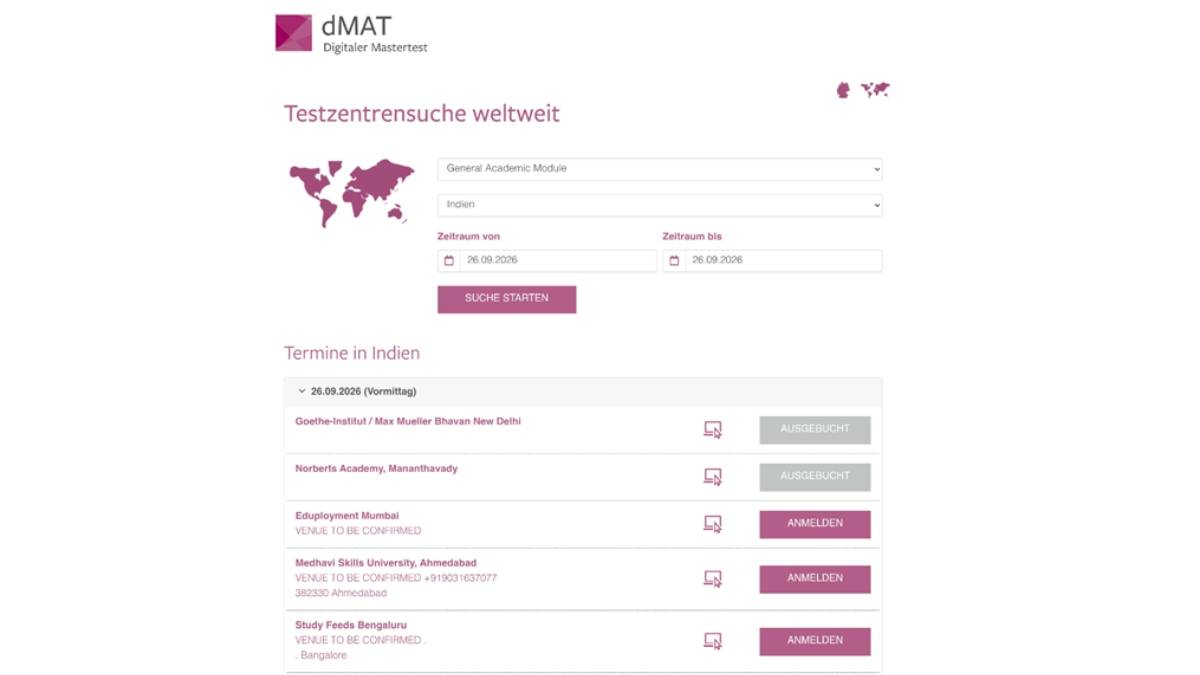
dMAT exam Module and Nationality
Step 5: Select a Test Centre
Scroll down and pick a preferred dMAT test centre. In India, centres are planned across cities, including Ahmedabad, Bengaluru, Bhopal, Chandigarh, Chennai, Kolkata, Mananthavady, Mumbai, New Delhi, and Pune. Once a centre is selected, click "Appointments" to view available dates.
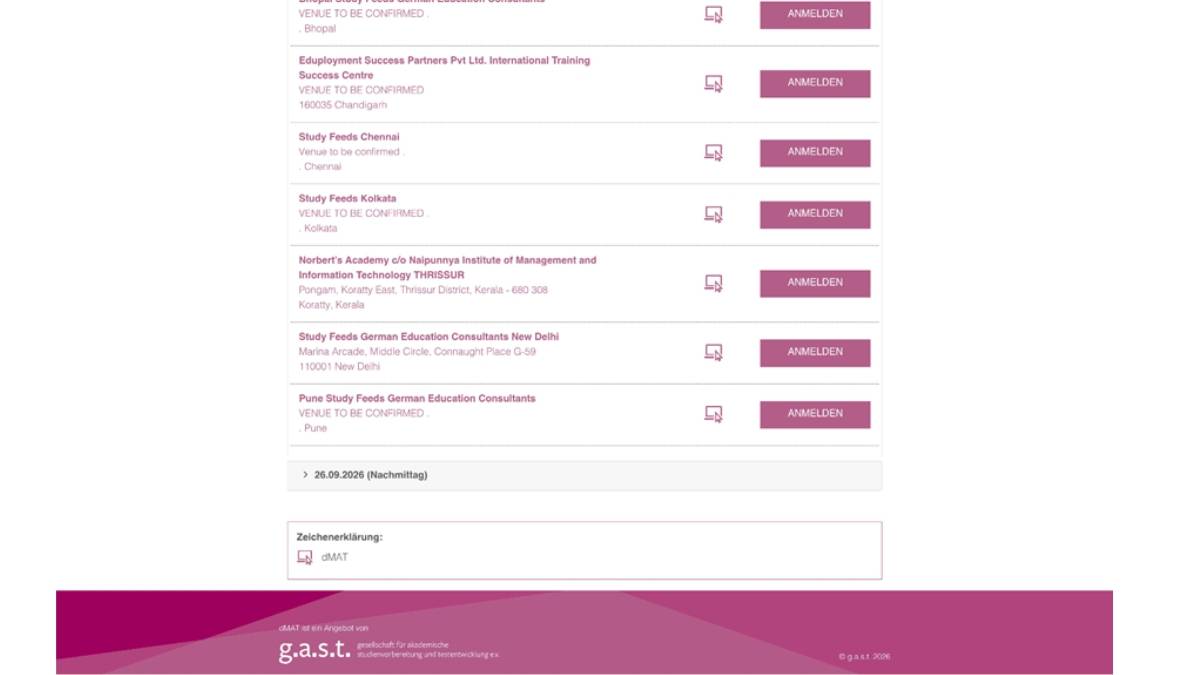
dMAT exam centre in India
Step 6: Choose an Exam Slot
Pick an available date and select either the Morning or Afternoon slot. The portal does not publish exact timings, but the morning session is expected to begin around 9:00 to 10:00 AM, and the afternoon session around 1:00 to 2:00 PM.
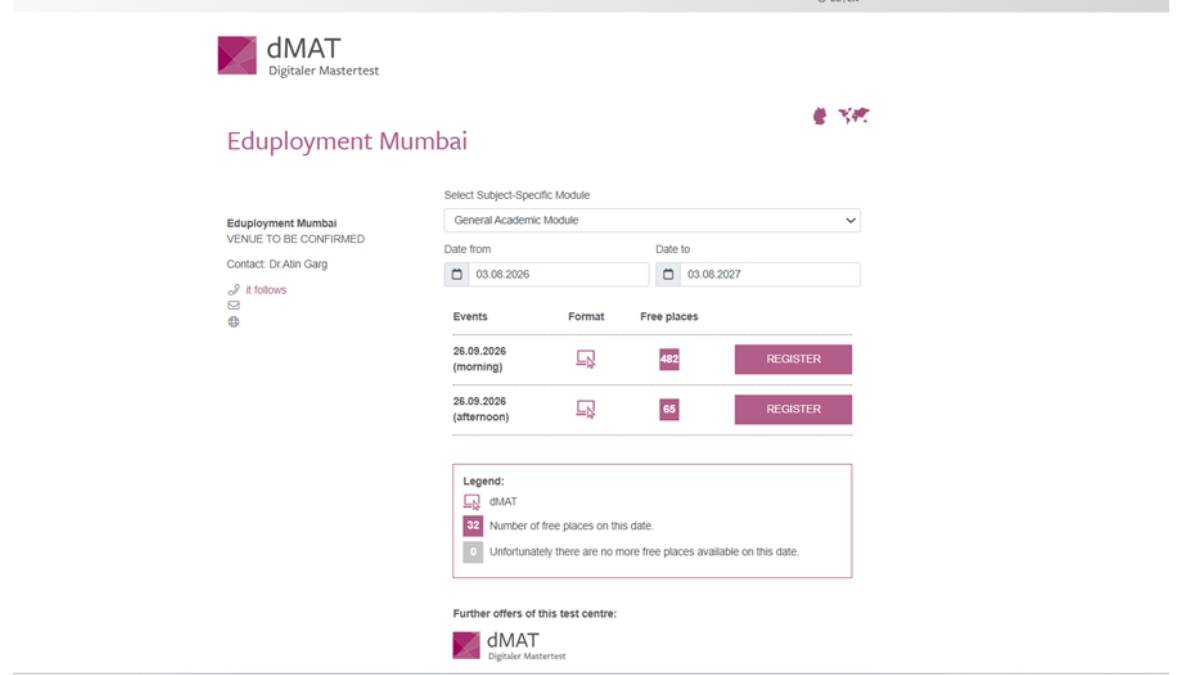
dMAT exam slot
Step 7: Create an Account
New users need to fill out a short form to create an account. This includes the name, date of birth, country of origin, email address, preferred username, and password. Existing users can simply log in with their details.
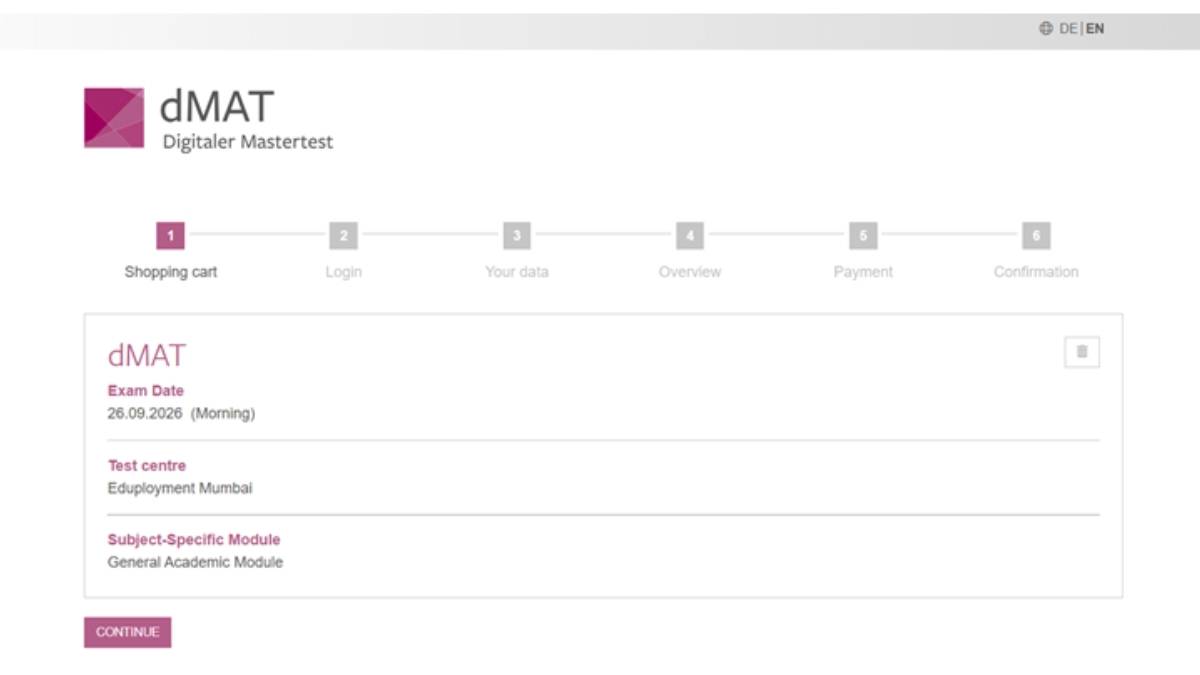
dMAT registration account creation
Step 8: Fill in Personal and ID Details
Enter the residential address on the personal information page. For identity verification, choose one of three document types: Identity Card, Passport, or Residence Permit. The ID number must be entered exactly as it appears on the document, since any mismatch can prevent entry to the exam on test day.
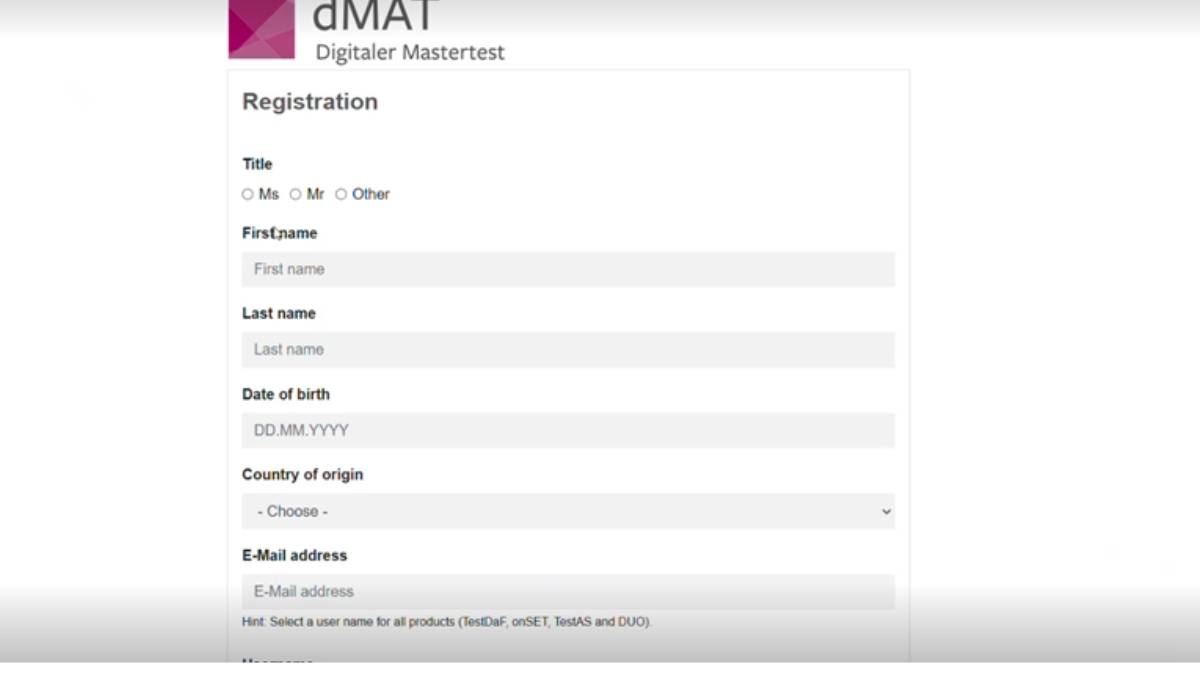
dMAT registration details
Step 9: Upload a Photo and Select the Language
Upload a clear identification photo and select English as the exam language before moving to the next page.
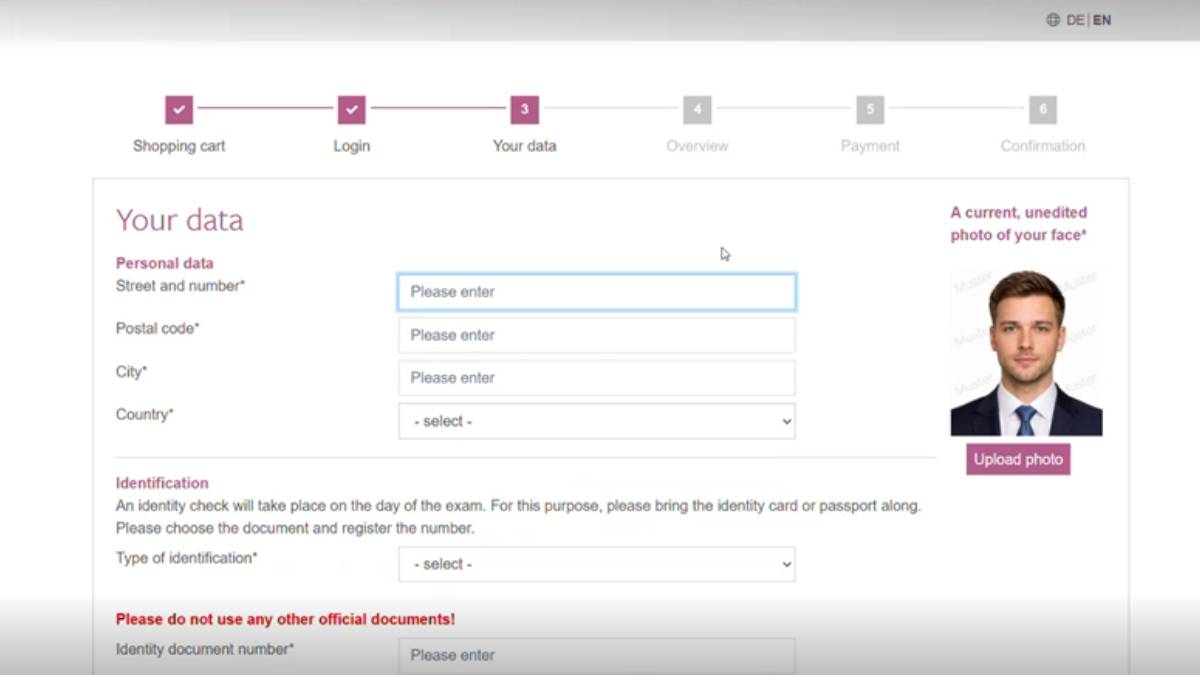
dMAT documents uploading
Step 10: Review Details and Confirm the Fee
Check all the entered information carefully. This page also shows the dMAT exam fee of 150 Euros (approximately INR 16,500 at current exchange rates). Click "Confirm" to move to the payment page.
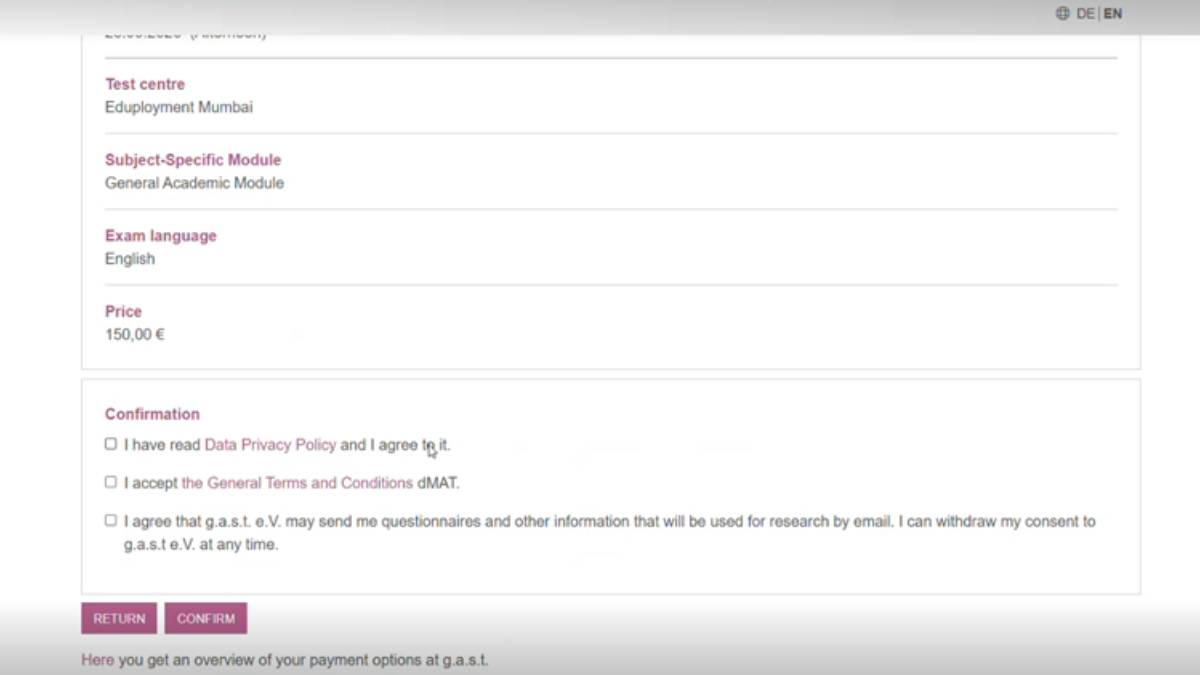
dMAT registration review page
Step 11: Complete the Payment
Select a preferred payment method, such as Card, PayPal, or Alipay, and complete the transaction. Once the payment is successful, the test slot is booked and a confirmation is shown on the portal with the registration details.
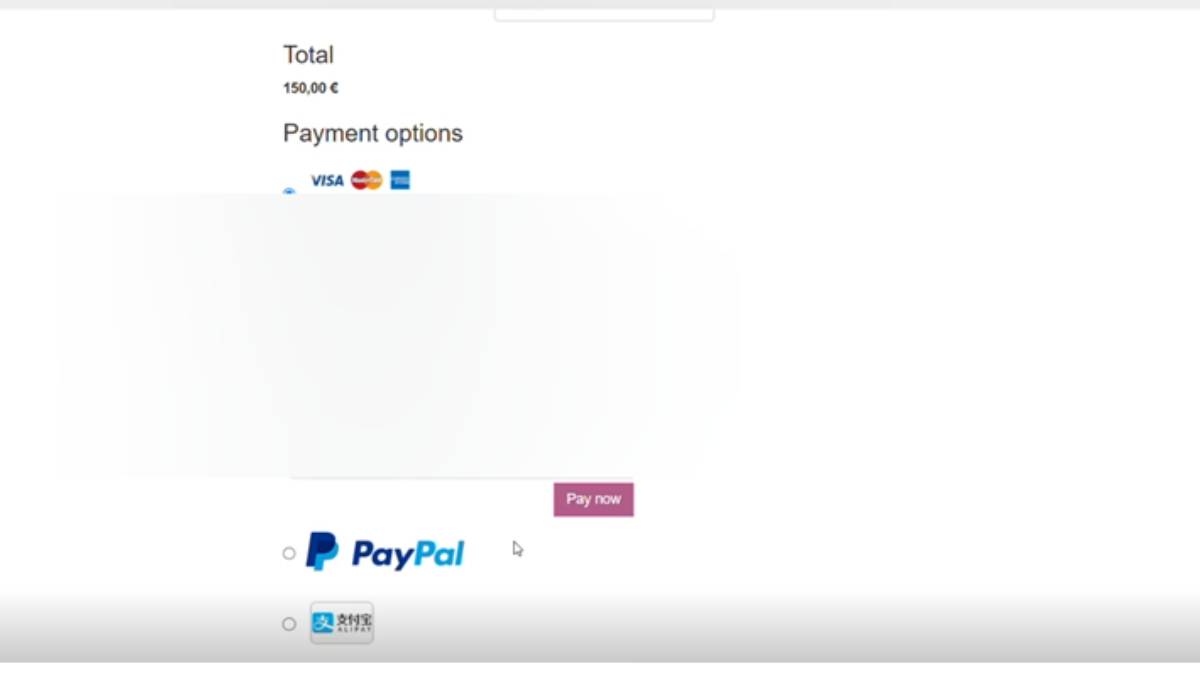
dMAT registration payment
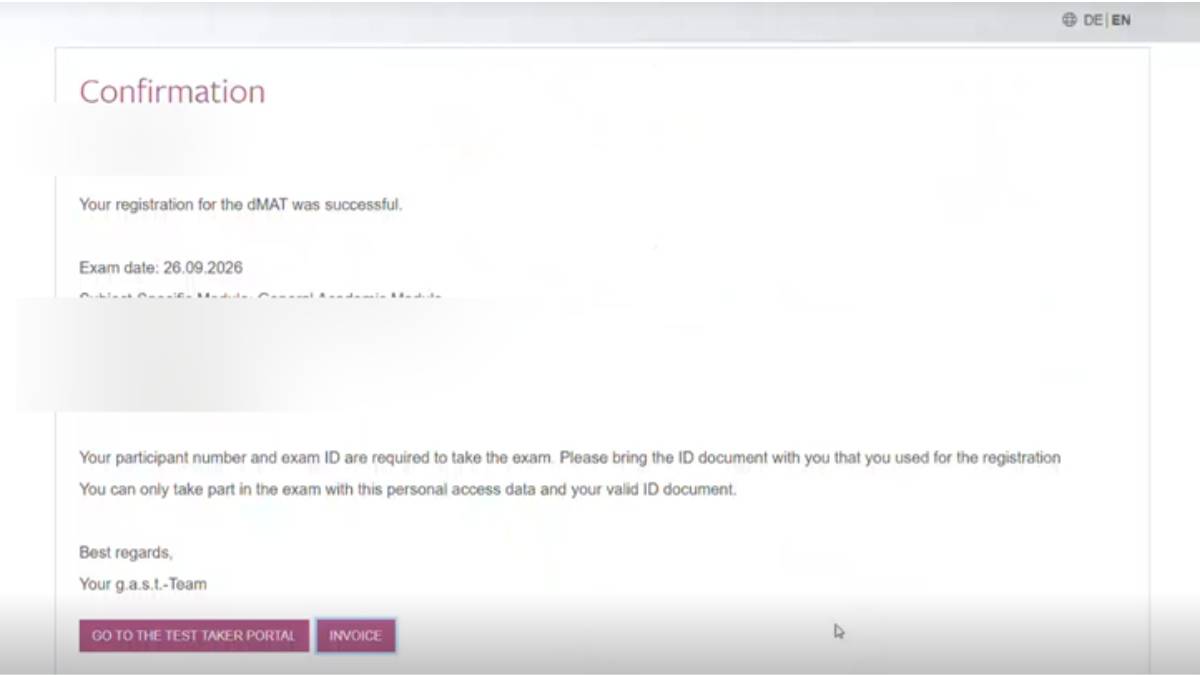
dMAT registration confirmation page
Note: It is a good idea to save the confirmation email and take a screenshot of the final booking page, since these are often needed later for admission or visa purposes.
dMAT Registration Fee 2026
Candidates must pay the registration fee to complete the dMAT Registration process. The application is considered successful only after the payment is processed. Students should keep a copy of the payment confirmation for future reference during the admission process.
| Particular |
Details |
|---|---|
| dMAT Registration Fee |
€150 |
| Approximate Fee in INR |
INR 16,355 (May vary depending on the exchange rate) |
| Payment Mode |
Online |
| Accepted Payment Methods |
Credit Card, Debit Card, PayPal, Alipay and other options available on the portal |
Once the payment is completed successfully, candidates receive confirmation of their exam booking through their registered email address.
Why Is There No Subject Module Option During dMAT Registration?
Many students registering for the dMAT are confused because the registration portal does not ask them to choose a subject-specific module. This has raised questions among applicants who came across older sample papers that included domain-specific questions. Based on the latest information available through the official registration portal and discussions among recent test takers, candidates currently do not need to select a separate subject module during registration.
At present, applicants only need to select the General Academic Module while completing the registration. According to information shared by candidates familiar with the latest dMAT exam syllabus, the General Academic Module also covers the second part of the examination. Instead of testing subject-specific knowledge, the exam focuses on how well candidates apply their cognitive and analytical skills to solve academic problems.
The current dMAT exam consists of two modules:
- Core Module: Tests general cognitive and analytical abilities through multiple subtests.
- Subject Module: Evaluates how candidates apply reasoning and analytical skills to solve general academic problems rather than testing memorised subject knowledge.
In other words, candidates are not required to prepare for a separate dMAT Engineering, Business, Finance, or Data Science subject paper based on the current registration process. The questions are designed to assess logical thinking, problem-solving, and the ability to apply concepts in academic situations instead of recalling factual information.
Some candidates have reported finding older dMAT sample papers with domain-specific questions. However, since the current registration portal does not provide an option to choose a specialist module, applicants should follow the latest exam format published through the official dMAT portal. Candidates are also advised to regularly check the official website for any updates, as the exam structure may change in future admission cycles.
What is dMAT Deregistration and How to Do It?
dMAT deregistration means cancelling your dMAT exam registration. Candidates can deregister only until the end of the registration period through the dMAT participant portal. After submitting the request, g.a.s.t. informs the selected dMAT test centre.
If the exam fee was paid online, the amount is refunded after deducting an administrative fee of up to 15%. If the fee was paid at the test centre, the test centre processes the refund after receiving official notification from g.a.s.t. If you deregister after the deadline, do not appear for the exam, or discontinue the exam, the fee is not refunded and no dMAT certificate is issued.
dMAT Registration FAQs

Commonly asked questions
Yes. One should enter their name exactly as it shows on the passport or ID. At the dMAT exam centre, there will be a security check on the details. And any mismatch can cause verification problems.
If your passport lists your first name with your father's name, write it exactly that way. Do not change or shorten your name. It must match your ID.
Candidates are not asked to select a subject-specific module during the dMAT registration process. The portal currently provides only the General Academic Module. So there is not other subject-specific registration for Computer Science students.
The official dMAT portal has not released any reasoning why there is no specialist module during dMAT registration. Currently, candidates can only select the General Academic Module.
Predict your IELTS, TOEFL, and PTE in just 4 steps!
Pick your stage and get free guidance from counsellors who've helped thousands get into top universities.
 Starting research
 Shortlisting colleges
 Exam preparation
 SOP/LOR writing
 Scholarship & finance
 Visa application
 Statement of Purpose
 Letter of Recommendation
 Student Visa Application
 Admission Essay Writing
 Student Curriculum Vitae
Comments
(1)
N
a week ago
Study Abroad Expert | Education Writer | International Admissions Specialist
Raushan Kumar is a Study Abroad Expert and Education Writer with over 6.5 years of experience in international higher education and educat
Read Full Bio