VITEEE 2026 Registration Ends Tomorrow: How to use image resizer for uploading photo, signature


With VITEEE 2026 registrations closing on March 31, it is a crucial period to submit application form. However, many students might be facing issues uploading photo and signature in VIT application form 2026. Read below on how to use photo resizer for VIT registrations.

VITEEE 2026 Registration Last Date
VITEEE 2026 registration last date is March 31. With the application last date announced, it’s now time to submit the VIT form as soon as possible. However, students who are facing error while uploading photo and signature, must keep one thing in mind, that documents must be uploaded as per guidelines.
Reasons for Error Uploading VIT Photo and Signature
Students who are facing issue while uploading VITEEE photo and signature can be due to following reasons -
- Images not edited as per the guidelines/specifications mentioned.
- File size too big
- Keeping dashboard ideal for a long time without performing any activity
- Poor internet connection
How to use photo resizer for VITEEE 2026 Registration?
To resize image as per dimensions issued by VIT authorities, candidates have to follow below-mentioned steps below -

- First scan your images properly
- Then go to any photo or image resizer website
- Enter dimensions as per guidelines
- Provide image format and keep the file size as mentioned in brochure.
- Download and save
Now go to VITEEE 2026 login page and upload documents in their respective sections carefully. Wait for sometime, as it may take a few seconds to get uploaded in application form. Fill rest of the details and complete registration process. Only registered candidates can access slot booking link. VIT entrance exam will be held from April 28 to May 3 in two shifts.
VITEEE 2026 Photo and Signature Guidelines
Candidates can refer to VIT photo and signature guidelines below -
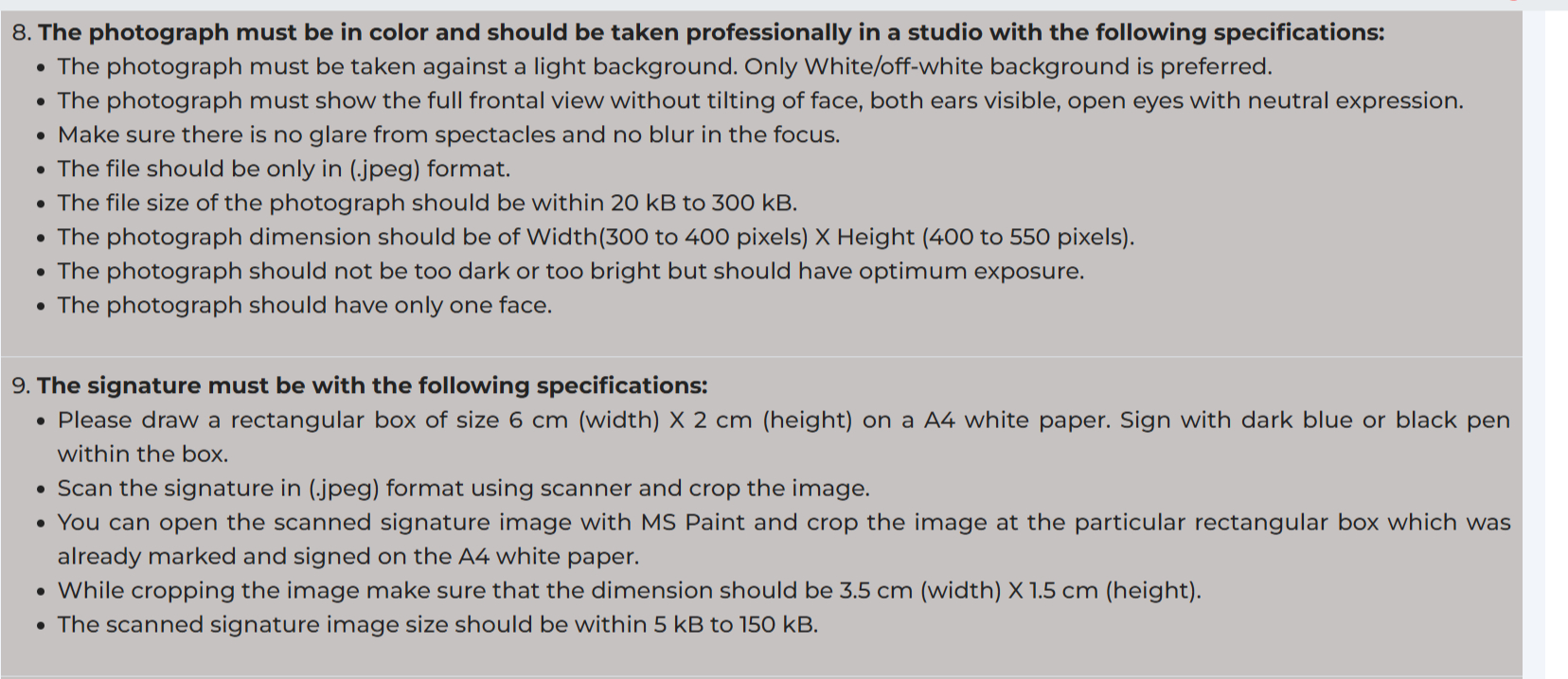
VITEEE 2026 photo and signature guidelines
Also read: VITEEE 2026 form last date tomorrow: how to fill form without any errors
Follow Shiksha.com for latest education news in detail on Exam Results, Dates, Admit Cards, & Schedules, Colleges & Universities news related to Admissions & Courses, Board exams, Scholarships, Careers, Education Events, New education policies & Regulations.
To get in touch with Shiksha news team, please write to us at news@shiksha.com

Upasana Pradhan is an Mtech graduate in Electronics and Communication Engineering from DTU who specialises in curating postgraduate and undergraduate engineering entrance exam content, such as GATE, TS PGECET, KCET,
Read Full Bio