JEE Advanced 2014: How to register for counselling
 Call 8585951111Got Doubts?

JEE Advanced 2014 exam results got declared on June 19 and the for Joint online choice filling & seat allocation process for admissions to IITs and ISM Dhanbad has begun today.
Students, who have qualified for JEE Advanced 2014 can register for the exam on the official website. The last date to register for the same is June 24 (up to 5 pm). Please note that the registration process is a one-time affair.
In case, if a student has already registered before, then they can proceed by entering their User ID, JEE Advanced 2014 Roll number, Password and enter the text displayed on the screen.
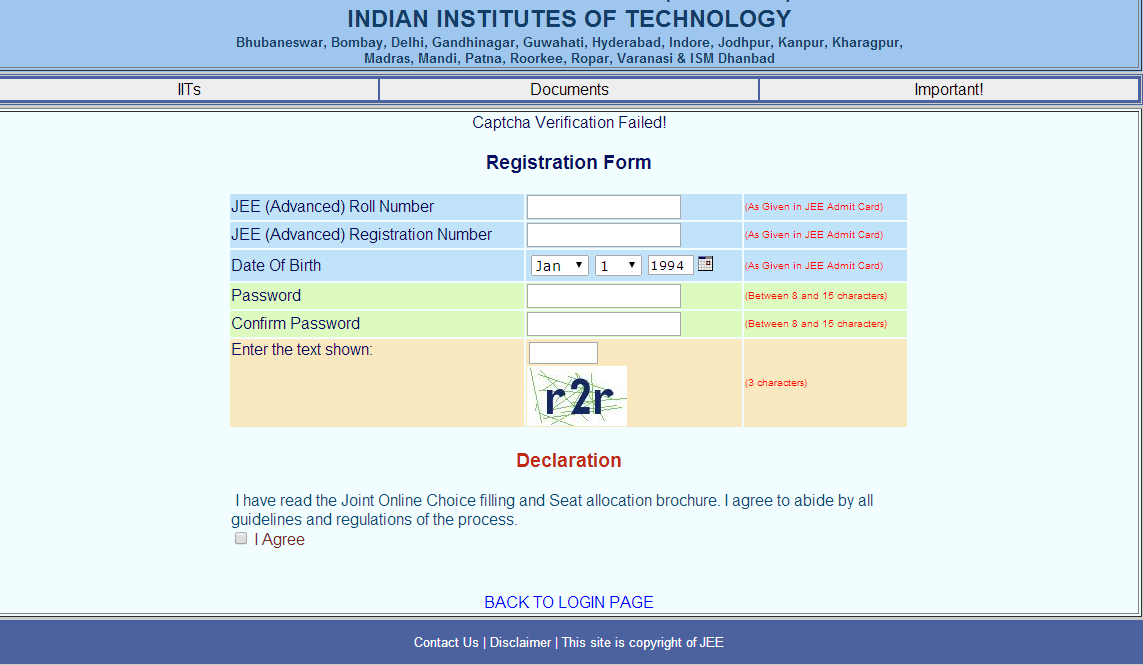
However, if a student hasn’t yet registered, then they have to enter the details shown in the image below:

Here are the steps that students need to follow after registering and signing in for the counselling:
Choice filling:
- Fill the choices as many as possible. JEE(Advanced) recommends minimum 50 number of choices.
- Click on the LOCK button to complete and close your choice filling.
- Once Locked (after a minimum of 50 choices), take a print out of your choices for safe-keeping.
- Wait for Seat Allocation
- Web release of 1st round of seat allocation: July 01, 2014
- Web release of 2nd round of seat allocation: July 07, 2014
- Web release of 3rd round of seat allocation: July 12, 2014
Seat allocation result:
- You need to sign in to know your seat allocation on the JOCSAP portal by giving your same User ID, JEE(Advanced) Roll Number and Password.
- Once you get a seat, you must proceed for online payment to book your provisional seat allocation.
Online payment process:
- After you receive the confirmation of payment , you need to return to the JOCSAP website. There you would be able to download the Declaration on Acceptance Form.
- Take the print out. The form should be signed by yourself and your parents/guardians Once seat acceptance form is uploaded
- If you do not pay by the scheduled date (to be announced), you will not be considered for future round of seat allocation.

Comments
(4)
K
2014-06-24 18:53:57
2014-06-24 18:57:51
S
2014-06-24 15:22:03
a
2014-06-21 16:48:01
h
2014-06-21 11:03:21