JoSAA 2015: Guidelines for online choice filling
 Call 8585951111Got Doubts?
JoSAA 2015: The online choice filling through the Joint Seat Allocation Process for admissions to IITs, NITs, IIITs, GFTIs etc is expected to commence today, July 1, as the JEE Main 2015 ranks are declared by CBSE (Central Board of Secondary Education).
The official website of JEE Advanced 2015 states, “ Filling-in of choices in JoSAA portal can begin only after CBSE announces JEE Main 2015 ranks. JoSAA portal will be opened for the candidates for online choice filling-in within 2 to 3 hours after CBSE hands over JEE Main 2015 ranks to JoSAA”.
Earlier, the Joint Seat Allocation Process was supposed to begin on June 25, however, due to the delay in the announcement of JEE Main 2015 ranks, the same got postponed. Recently, JoSAA 2015 released the revised schedule for Joint Seat Allocation Process which is expected to commence soon. A third and final revised schedule has been released today. Take a look at the final revised schedule for Joint Seat Allocation Process here.

Read this JEE Main 2015 Rank Notification released by CBSE about JEE Main 2015 ranks!
Once the JEE Main 2015 ranks are declared, the online choice filling will commence. Till then, take a look at this step by step guide for online choice filling:
Step 1:
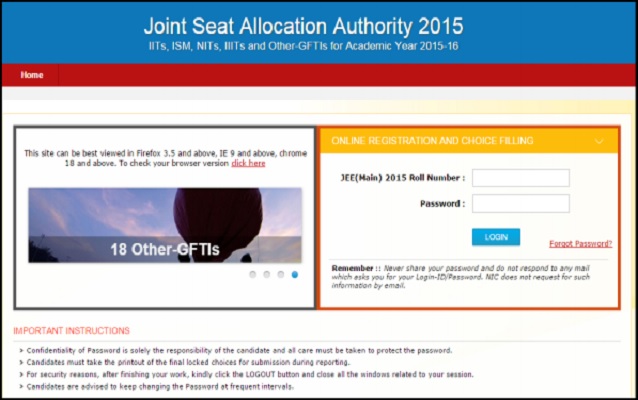
To start with, students will have to click on “Online Registering and Choice Filling” on the official website of JoSAA - http://josaa.nic.in/.

And once you do that, enter your JEE Main 2015 Roll number and Password to login to the Portal.
Step 2:
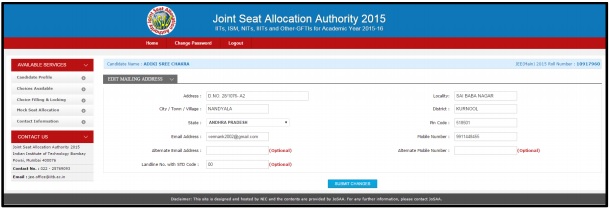
At the second step, aspirants need to go to their profile and make sure that all the personal details displayed are correct. During the registration process if candidates desire to update their Gender and State of Eligibility, they will be able do so. Rest of the information in registration Form is in Read only mode.

Click ‘CHANGE PASSWORD' to change your password. Please note that this step is compulsory.

To modify contact details, you need to go to the section named Contact Details and click “EDIT CONTACT DETAILS”

After editing the same, click on “SUBMIT CHANGES”.
Step 3:
Now you need to click the “Choices Available” button in order to view the various programs available that you can choose from.

- Aspirants who have qualified in both - JEE Main 2015 and JEE Advanced 2015 can choose from all the choices available. Please note that some of the courses have certain restrictions.
- Candidates who have qualified only in JEE Main 2015 will have restricted choices to choose from programs available in NITs, IIITs and Other-GFTIs.
- Candidates can choose to view the available programs Institute-wise or discipline-wise. They can also take a printout.
Step 4:
The next step is to go to Click the Choice Filling & Locking button as displayed below.

Aspirants need to click the academic programs available tab on the left panel and it will appear automatically in “Filled Choices” on right side column.
Through this, aspirants will be able to fill as many choices as possible to enhance their chances of getting a seat.
Aspirants who have qualified JEE Advanced can fill all choices (~600)*. JEE (MAIN) 2015 qualified candidates can also fill all choices except those of IITs and ISM.
*Some restrictions do apply for some programs based on candidature. Such programs may not be listed among the available choices. Click on Arrange Filled Choices to modify the order of preference. For example: to change the first option to second just click “MOVE DOWN” arrow or vice versa. This way, you can reshuffle the order of preference of choices.

Step 5:
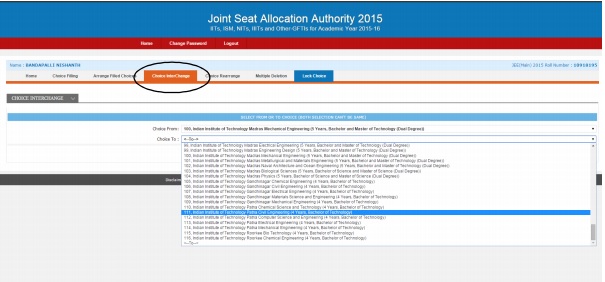
Click on the tab that says “Choices InterChange” in order to modify the order of preference. For instance: choice number 100 is changed to choice 111. Automatically 111 will become 100.
Click on the “Choice Rearrange” button to change the preference of more than one choice. For e.g: Choice numbers given in the extreme right column can be rearranged as shown below:

Changed sequences can be seen below: Choices 1, 2, 3 and 4 are renumbered as 5, 6, 7 and 8. Similarly 5, 6, 7 and 8 are renumbered 1, 2, 3 and 4. By clicking SAVE, modified sequence will appear on the screen. Please make sure that the same number is not typed twice.
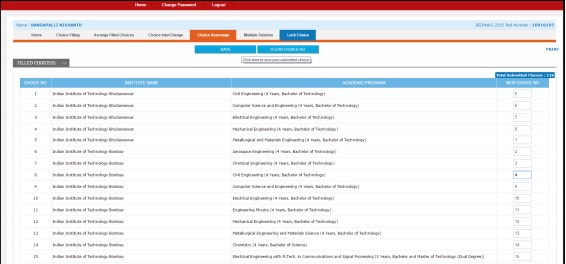
After saving, the updated right order will appear on the screen. After clicking SAVE option, the choices filled will be updated as shown below with a message.
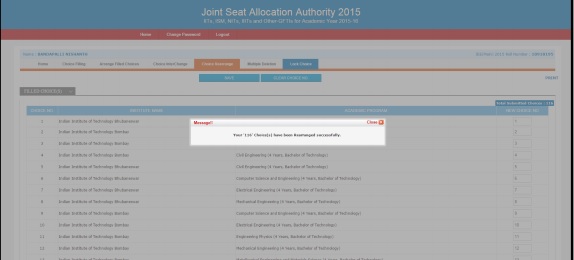
Close the box to view the new preference list (see below):

Students can click the “Multiple Deletion” button to delete more than one filled choices.
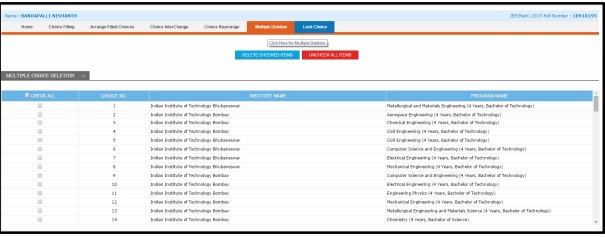
Aspirants can check all or check only the selected choices to delete the same from the list.

These options will be deleted from your choices list and the remaining choices will be automatically reordered as shown below:
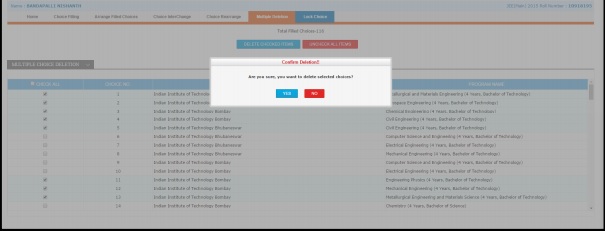
When the above message appears, click YES to delete or say NO to go back again to modify the deleting list or lock choice. After saying YES, the choices appear as shown below which do not contain the deleted ones.

Step 6:
At this step, students should now click 'LOCK CHOICE' option.
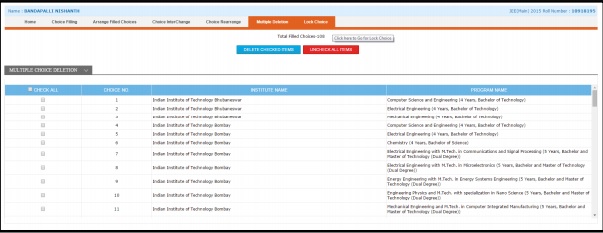
After completing the choice filling process, aspirants can either click on ‘I agree to lock my choices’, complete the choice filling process and take the printout or if they want to modify any of their choices filled later, they need to click on ‘I will lock my choices later’.
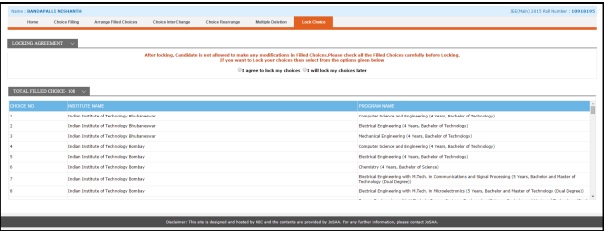
After aspirants click ‘I agree to lock my choices’, the screen will appear as shown below:
Students will be again asked for their final consent. In order to protect your choices filled, you have to enter your password again to complete the choice filling option.
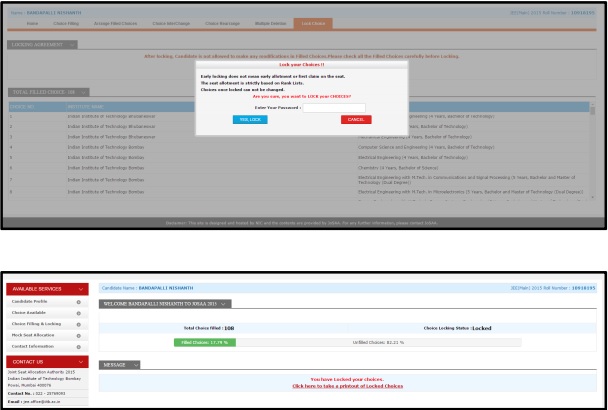
Now, aspirants need to Click the “click here to take a printout of Locked Choices” tab which will appear as shown below. It may run into few pages depending on the number choices filled by the candidate.
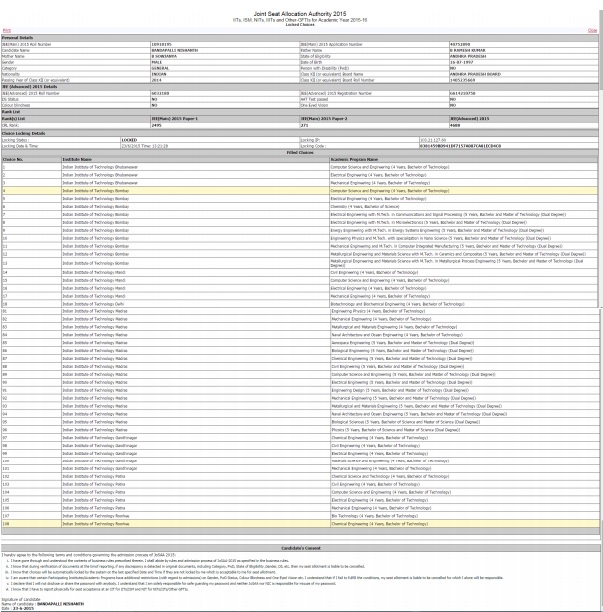
The last step requires the candidate to read the above terms and conditions carefully and sign at the specified place and present it at the reporting center along other relevant documents.
Check out the colleges accepting JEE Main scores in the following cities:
Other related articles:
IITs & ISM Dhanbad Opening and Closing Ranks for 2014 admissions
Popular colleges for engineering entrance exams
Understand Joint seat allocation for IITs, NITs, IIITs & GFTIs
Engineering Colleges Admitting Students Through Joint Seat Allocation 2015
