KEA Opens UGCET 2026 Marks Fetching Portal for Non-Karnataka Board Students


KEA has launched a secure login portal for UGCET 2026 candidates from non-Karnataka boards (CBSE/ICSE) to auto-fetch their 10+2 marks. Applicants must log in using their credentials such as application number, password, and captcha. An official YouTube video has been uploaded to guide students through the process. Check the detailed report here.

UGCET 2026 Marks Fetching Portal Open for Non-Karnataka Board Students
The Karnataka Examinations Authority (KEA) has activated a secure login portal for UGCET 2026 candidates from non-Karnataka state boards. By the help of this portal, candidates who completed their 10+2 / Class 12 exams under boards like CBSE, CISCE, and other Karnataka boards can autofetch their scores. This facility streamlines the documentation process for admission to undergraduate courses across the state.
Also read: Following Release of Final Answer Key; KCET Results 2026 Expected Anytime Soon
How to Access Portal and Auto-Fetch Marks?
The exam body has shared the direct link for the same and candidates eligible for the marks fetching window must navigate to the official portal to update their application profiles.

-
The facility is accessible via the KEA Common Online Application Portal under the UGCET 2026 Section -cetonline.karnataka.gov.in/OnlineApp2026/forms/Login.aspx
-
To access digital form, enter Application Number, Account Password, and the visible Captcha Verification code.
-
Once logged into the applicant console, the system safely connects to respective board databases to map and automatically retrieve the 10+2 marksheet information.
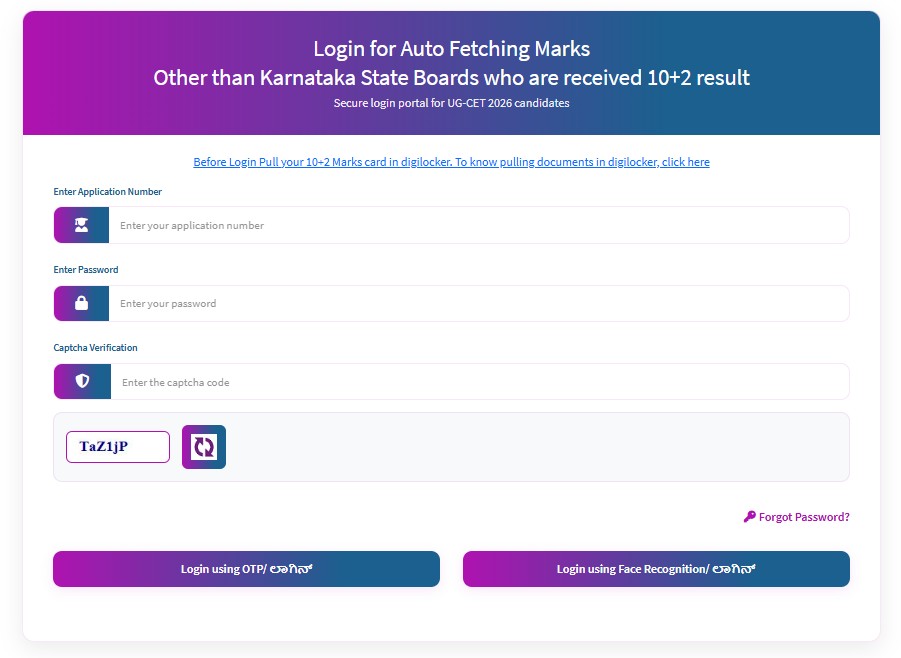
KCET Login Window for Auto Fetching Window 10 +2 Scores
KEA has emphasized specific guidelines regarding who must use this online facility and this portal is intended for CBSE, CISCE, and other non-Karnataka state board students. It addresses droppers or candidates who completed their 10+2 requirements prior to the current 2026 timeline. Regular 2026 batch candidates from Karnataka PU Board do not need to log into this portal, as their board results are integrated directly into the core ranking system by KEA.
Step-by-Step DigiLocker Guide Published by KEA

Commonly asked questions
Each paper of KCET exam is conducted for 80 minutes. The Kannada language exam of KCET will be conducted for 60 minutes for Horanadu and Gadinadu Kannadiga candidates. KCET exam Biology and Mathematics exam will be conducted on same day while Physics & Chemistry exam will be conducted on separate day.
Karnataka CET also known as KCET is state-level entrance exam organised by KEA yearly. The objective is to shortlist students for admission in undergraduate (UG) courses in participating colleges in Karnataka state.
The exam body released the exam dates for the KCET 2026 on its official website. As per the dates, the test was conducted on April 23-24, 2026.
To minimise errors during data submission, KEA has also released a youtube video showcasing the guide to fetch the marks from DigiLocker. Candidates can refer to a video for a detailed process. Candidates must complete auto-fetching verification to ensure smooth processing of their upcoming UGCET rank calculation and counselling phases.
Follow Shiksha.com for latest education news in detail on Exam Results, Dates, Admit Cards, & Schedules, Colleges & Universities news related to Admissions & Courses, Board exams, Scholarships, Careers, Education Events, New education policies & Regulations.
To get in touch with Shiksha news team, please write to us at news@shiksha.com
Comments
(1)
r
3 months ago
Vikrant Shukla - Deputy Manager
Role: News Writer & Editor
Education: Graduation in Mass Communication, Master's in Political Science
Expertise: Engineering and IT & Software Exams
About: Vikrant has 10+ years of ex
Read Full Bio