
SITEEE 2020 Login: Admit Card, Result, Counselling Link
SITEEE 2020 login window is important for filling application form, admit card download, checking result, etc. Get the SITEEE login link below.
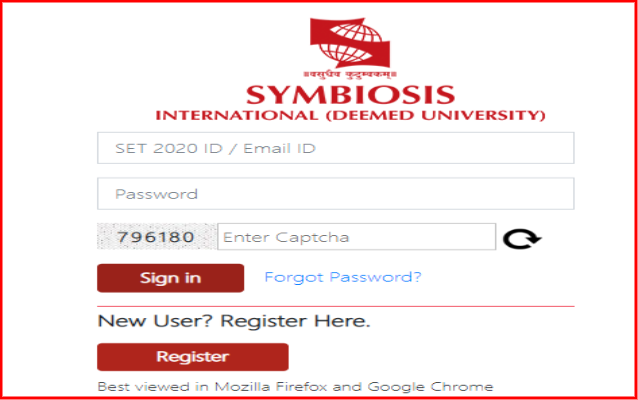
SITEEE 2020 login window used to access aspirants’ account in online mode. The login window is used for multiple purposes such as filling the application form, modifying details in the application form, download admit card, check result and counselling details.
SET (SITEEE) login window can be accessed by visiting the official website www.set-test.org. The login window is used to perform all the online operations discussed above. The details such as email ID and password is required to access the aspirants’ account through SITEEE login window. Check more details related to the SITEEE login below.
Click here for SITEEE 2020 Login
- How to create SITEEE 2020 login
- SITEEE login 2020 to download admit card
- SET (SITEEE) login to check result
How to create SITEEE 2020 login
Aspirants can create the login, after exercising the registration process successfully. Check the steps to create the login below.
- Go to the official website
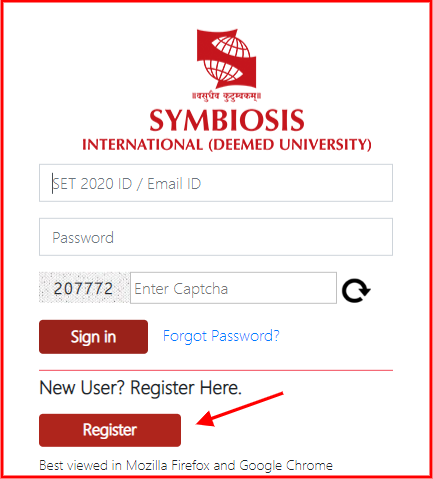
- Click on the “Register Now” tab

- Then click on the “Register” button to start
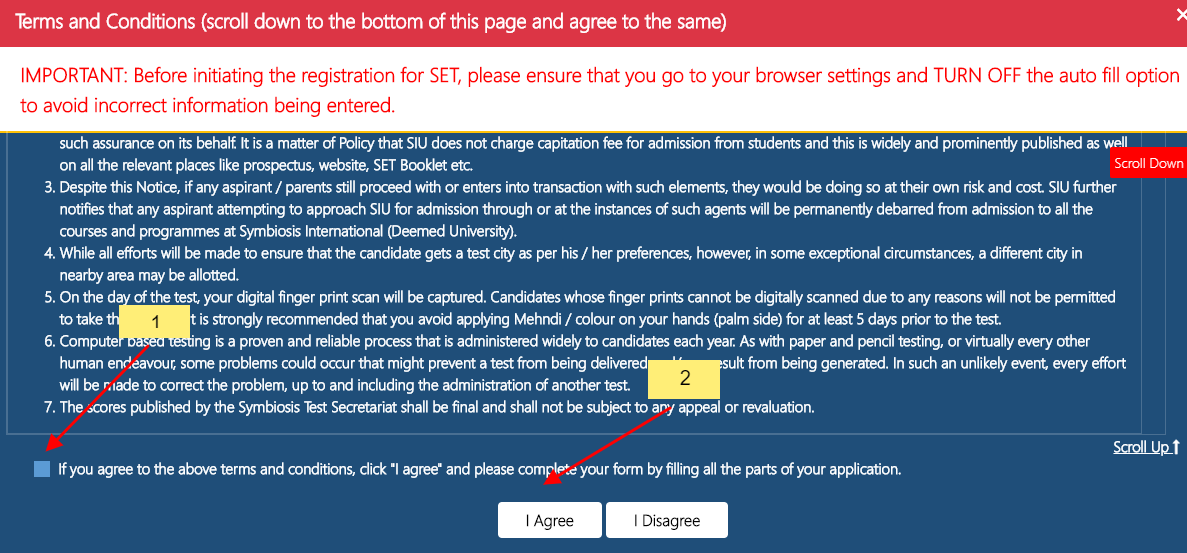
- Select the declaration box and click on “I agree” to accept the terms
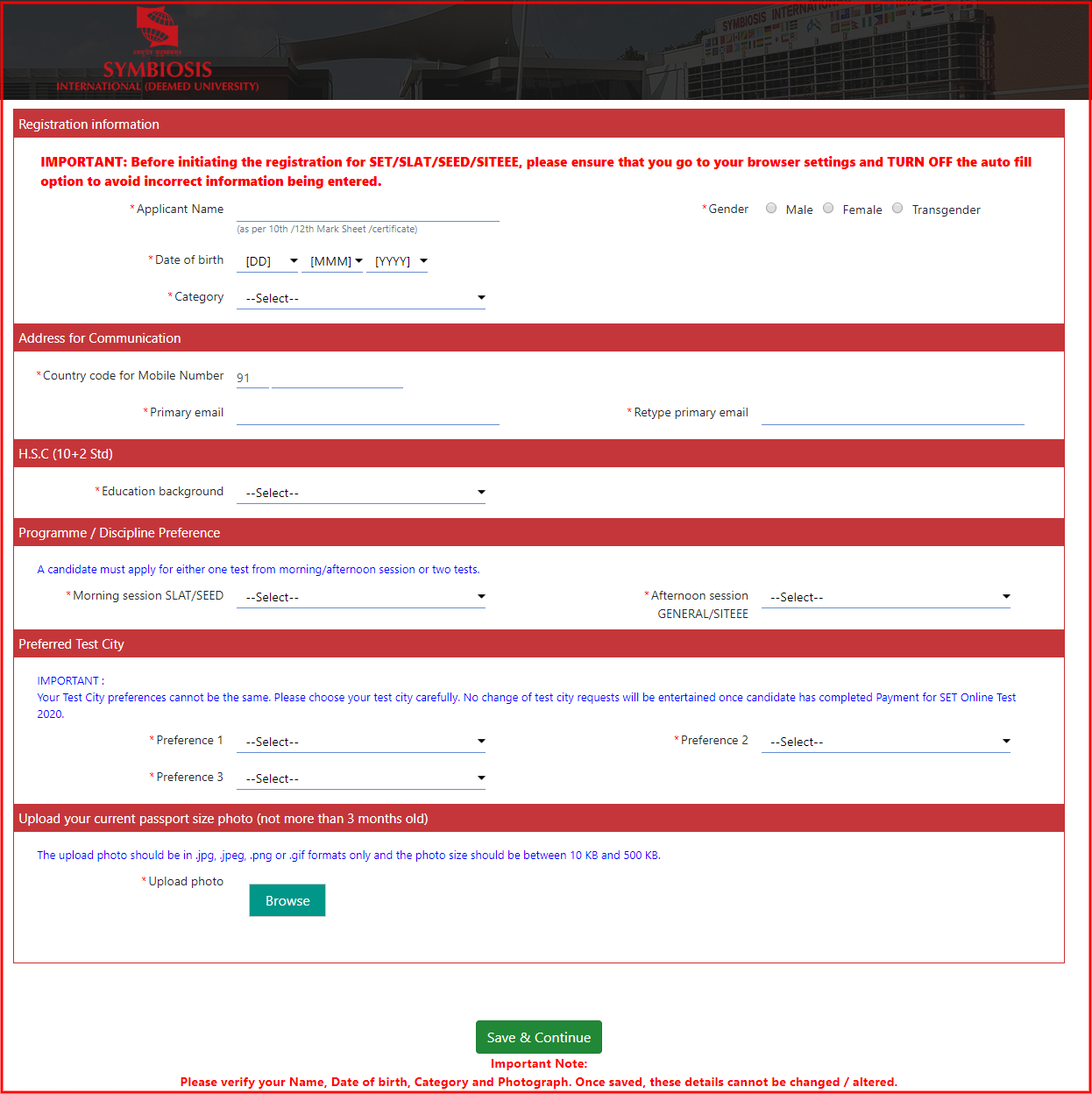
- Then fill the details such as personal details, academic details, etc.
- After completing all formalities, aspirants will be registered successfully
SITEEE login 2020 to download admit card
To appear in the exam, aspirants have to download their SITEEE admit card. They will be able to download the admit card through SITEEE 2020 login. Aspirants should keep the login details safely. Without admit card, no aspirant will get permission to appear in the exam. The steps to download the admit card through SET login are given below.

- Go to the official website
- Click on the “User Login” tab
- The page to enter the login details will open in a new tab
- Fill email ID, password and captcha code in the given space
- The admit card will be displayed on the screen
- Check the details carefully and download it for further use.
SET (SITEEE) login to check result
Aspirants will be able to check the result online by logging into their account. SITEEE 2020 result will be declared after the conduct of the exam for the aspirants who will appear in the exam. The result will not be shared through the post, fax, etc. Check the process to download the result through SITEEE 2020 login below
- Go to the official website
- Find the login link
- Enter the login details such as email ID, password and captcha code
- The result will be displayed on the screen
- Download it and keep it safe for further use
Read More:

News & Updates
Photos & Videos






+6
Contact Details
Address
Near Lupin Research Park,
Gram: Lavale, Tal: Mulshi
Lavale Village, Pune ( Maharashtra)
Other Popular Symbiosis Institutes
Symbiosis Institute of Computer Studies and Research, Symbiosis International, Pune
Symbiosis Institute of Business Management, Symbiosis International, Bangalore
Symbiosis Institute of International Business, Symbiosis International, Pune
Get details of Similar Colleges

Student Forum
 Anything you would want to ask experts?
Answered a month ago
No, direct admissions are not available for various courses at Symbiosis Medical College for Women. Admissions are entirely based on the entrance test scores and the counselling rounds. All admissions for MBBS programme at SMCW will be done through NEET-UG on merit basis in the form of a rank obtain
L
Contributor-Level 10
Answered 2 months ago
For an IT career, all three options are good, but they focus on different areas:
Christ University – BCA: Very popular programme with strong placements and industry exposure.
Symbiosis International University – BCA: Good reputation and modern curriculum in IT.
Symbiosis School for Artificial Intellige
J
Beginner-Level 5
Answered 4 months ago
The highest package offered during SIT Pune placements 2026 was INR 27 LPA.
D
Contributor-Level 10
Answered 4 months ago
Some of the top recruiters that visited the campus during SIT Pune placements 2026 included Oracle, Capgemini, Deloitte and ZS Associate.
N
Contributor-Level 10
Answered 4 months ago
As on May 2026, 94% students have been placed during the SIT Pune placement drive 2026. More than 90% students were placed in 2025 and 2024 at SIT Pune.
C
Contributor-Level 10
Answered 4 months ago
SIT Pune is good in terms of placements. The placement record of past two years are mentioned below:
Particulars | Placement Statistics 2025 | Placement Statistics 2026 |
|---|---|---|
Highest package | INR 24 LPA | INR 27 LPA |
Placement rate | 92% | 94% |
Highest stipend offered | INR 75,000 | INR 85,000 |
P
Contributor-Level 10
Answered 4 months ago
The average salary trend witnessed during SIT Pune placements is mentioned below:
Particulars | Placement Statistics 2023 | Placement Statistics 2024 | Placement Statistics 2025 |
|---|---|---|---|
Average package | INR 8.4 LPA | INR 12.97 LPA | INR 8.91 LPA |
M
Contributor-Level 10
Answered 4 months ago
The highest domestic package offered during SIT Pune placements 2026 was INR 27 LPA. The highest stipend offered was INR 85,000 per month.
N
Contributor-Level 10
Are direct admissions available at Symbiosis Medical College for Women?