
NSOU Results 2020: Semester, Evaluation

Netaji Subhas Open University (NSOU) is a state Open University imparting distance education in India. NSOU has released term-end results on the official website of the University. The University has released the results for UG, PG and diploma programmes such as BDP, BPP, BCA, MCA, PGP and PGD. NSOU organises UG and PG programmes in March/ April every year.
The University follows a term-end examination pattern for all UG and PG programmes. First-year examinations are conducted at the end of the first year, second-year examinations are conducted at the end of the second year. Candidates need to click on the desired subjects to view results.
| Exam Name |
Result |
|---|---|
| NSOU BDP results |
|
| NSOU BPP results |
|
| NSOU BCA results |
|
| NSOU MCA results |
|
| NSOU PGP results |
|
| NSOU PGD results |
- NSOU Results 2020
- NSOU Evaluation Process 2020
- NSOU Revaluation Process 2020
NSOU Results 2020
The results for UG, PG and diploma programmes were announced on the official website of the University. Candidates can check results by clicking on desired subjects. Follow the below-mentioned steps to check NSOU results 2020:

1. Visit the official website of the University, www.wbnsou.ac.in

2. Click on “Results” tab to view course-wise results
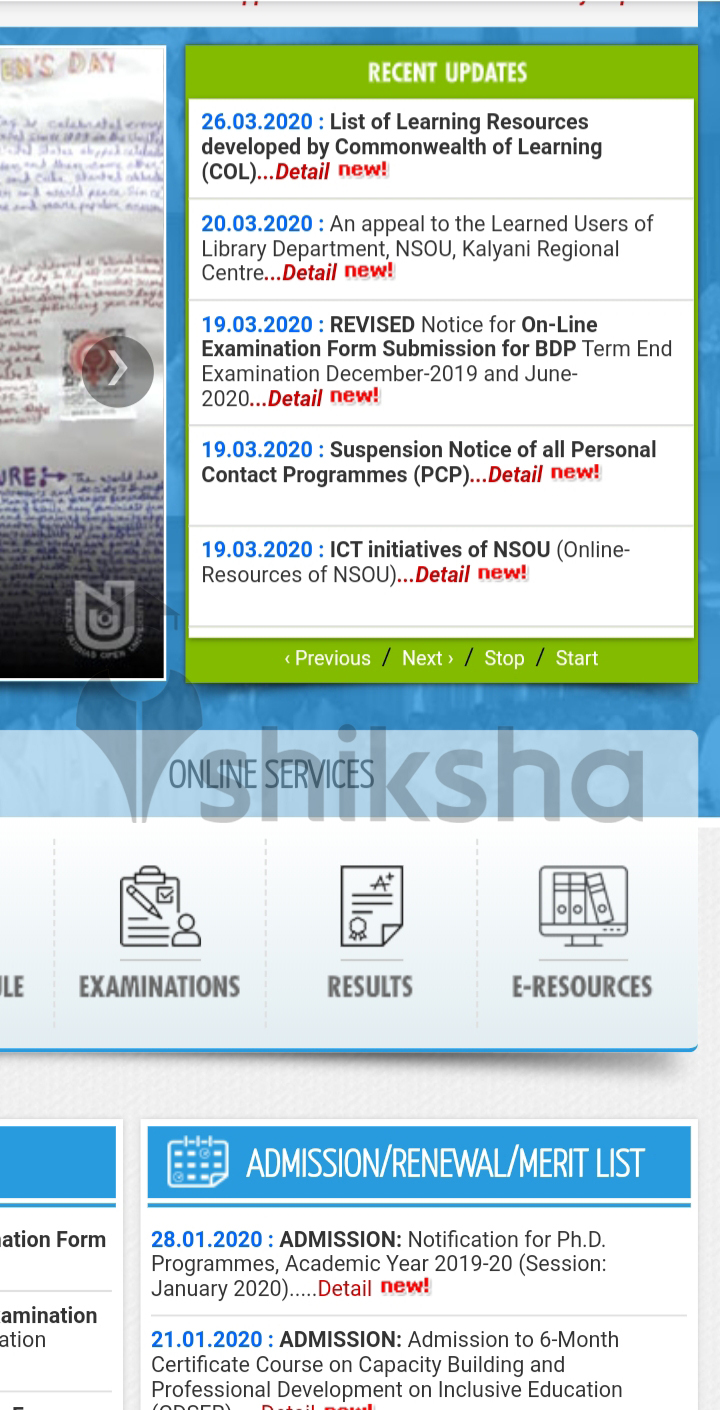
3. Click on the desired subject to view results

4. Select the publication year from the dropdown menu

5. Choose your subject and click on indiaresults/ exametc
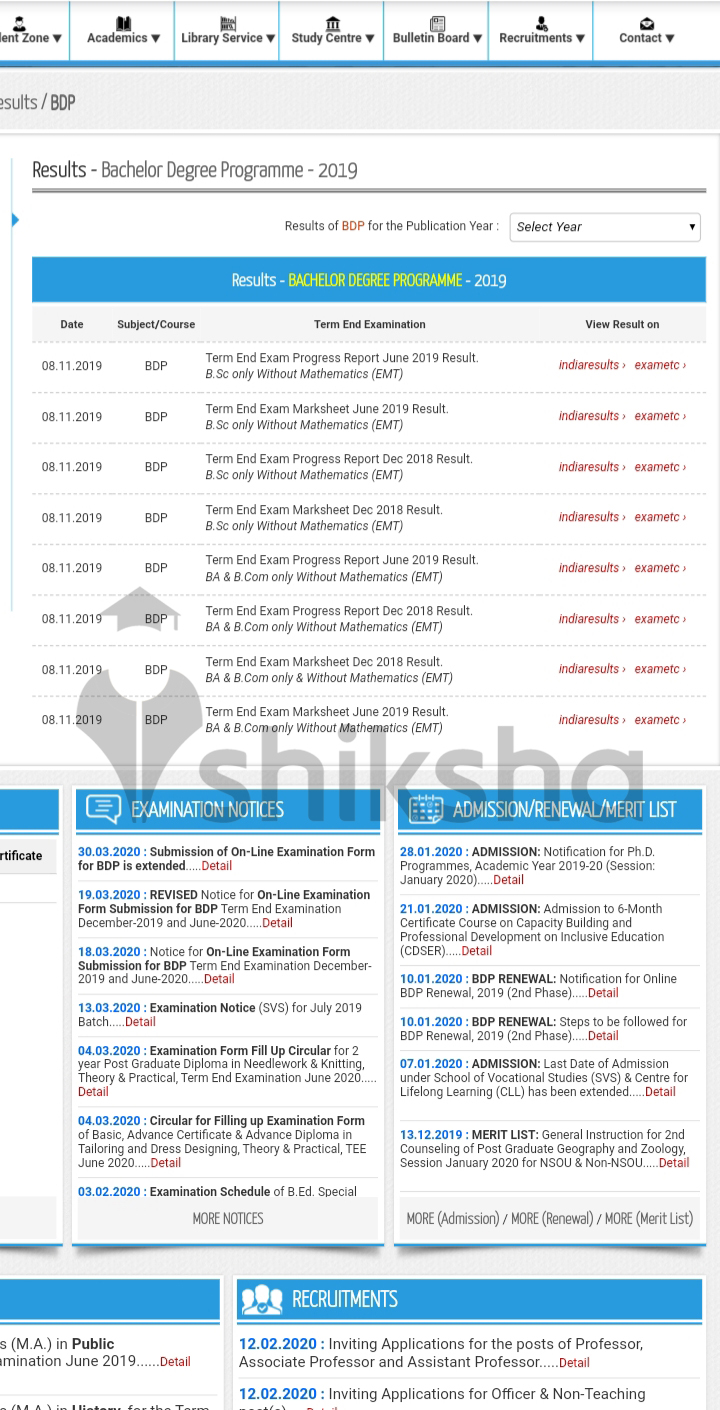
6. Enter your roll number to view results

7. The marksheet will appear on the screen

8. Download your marksheet and take a printout for further use
NSOU Evaluation Process 2020
Candidates must secure at least 40% aggregate in every paper to pass term-end examinations. A candidate can appear for the term-end examination along with backlog. In Open and Distance Learning (ODL), candidates are evaluated basis on assignments. In compiling results, 20% result depends on assignment evaluation and 80% result depends upon the performance in the term-end examination.
For example, for a subject having total marks of 100, the theory paper will have 80 marks and the assignment will have 20 marks.
(I) Assignment/ Internal Assessment:
Assignment plays an important role in the evaluation process. The credits obtained in the assignment will be entered into a student’s individual record of performance. This will hold 20% of the total credit points. Every student needs to submit the assignment before the term-end examination. If the assignments are not submitted within a given time, the respective subject will be held as not clear (NC).
(II) Term-End Examination:
The term-end examination holds 80% credit of the entire subject. A candidate must have 40% aggregate in each paper to clear the term-end examination. The University allots a grade for each subject after the final evaluation. The allotment of grades is done on the below pattern:
| Marks Obtained |
Class |
Grade |
|---|---|---|
| 70% and above |
1st class |
A+ |
| 60% to 70% |
A |
|
| 55% to 60% |
2nd class |
B+ |
| 45% to 55% |
B |
|
| 40% to 45% |
C |
NSOU Revaluation Process 2020
NSOU allows students who are getting a fewer mark or fail mark in subjects to apply for revaluation. Candidates need to fill the revaluation form along with fee payment of Rs 300 to Rs 400 per paper for any subject. After that, the totalling of the scores will be done by the NSOU teaching staff only. Then, the students can see the revaluation results at the official website of the University. Follow the below-mentioned steps to apply for the revaluation process:
- Visit the official website of the University, www.wbnsou.ac.in
- Click on the revaluation link of the homepage
- Fill the revaluation form by entering the required details
- Submit the form along with online fee payment via debit/ credit cards or net banking
- Click on the submit button to submit the form
News & Updates
Photos & Videos


+5
- B.A (Bachelor of Arts)
- M.A. (Master of Arts)
- MSc (Master of Science)
- BSc
- B.Ed
- MSW (Master of Social Work)
- M.Com
- MBA (Masters of Business Administration)
- Social Responsibility
- B.Lib.I.Sc. (Bachelor of Library and Information Science)
- M.Ed (Master of Education)
- BCom (Hons)
- Humanities & Social Sciences
- Science Subject
- Teaching & Education
- Commerce
- Beauty & Fitness
- Design
- Business & Management Study
- Medical Courses
- Top Private Law Colleges in Kolkata
- Top Colleges Colleges in Kolkata
- Top Commerce Colleges in Kolkata
- Top Mass Communication Colleges in Kolkata
- Top Medical Colleges in Kolkata
- Top Research Institutions Colleges in Kolkata
- Top Private Engineering Colleges in Kolkata
- Top Private Fashion Design Colleges in Kolkata
- PG Diploma colleges in Kolkata
- UG Diploma colleges in Kolkata
- Certificate colleges in Kolkata
- M.A. colleges in Kolkata
- B.A. colleges in Kolkata
- MBA colleges in Kolkata
- B.Sc. colleges in Kolkata
- M.Sc. colleges in Kolkata
- After 10th Diploma colleges in Kolkata
- Ph.D. colleges in Kolkata
- M.Ed colleges in Kolkata
- B.Com colleges in Kolkata
- M.Com colleges in Kolkata
- MSW colleges in Kolkata
- B.Com (Hons) colleges in Kolkata
Contact Details
Address
DD-26, Sector-I, Salt Lake City
Bhawanipur, Kolkata ( West Bengal)
Get details of Similar Colleges

Student Forum
 Anything you would want to ask experts?
Answered a year ago
If you're looking for a Fashion Design degree from Netaji Subhash Open University (Kolkata), here's the catch - it doesn't offer a full bachelor's in fashion. You'll find certificate/diploma courses in tailoring and design, but that's it. If you're looking for a proper 3-year Fashion Designing UG de
S
Contributor-Level 9
Answered a year ago
Both the mentioned open universities can be compared based on their course fees, degree value, students reviews, curriculum, etc. In fee comparison, NSOU BA (H) course is cheaper with tuition fees of INR 9,900, while BA (H) at Odisha State Open University is INR 11,700. There is not a huge fee diffe
A
Contributor-Level 10
Answered a year ago
Yes, Netaji Subhas Open University BA admissions for the academic year 2025 are ongoing. Prospective candidates are advised to visit the official website to apply online. To stay updated about upcoming events, it is suggested that the university's official website be checked regularly. The admission
N
Contributor-Level 10
Answered a year ago
Yes, Netaji Subhas Open University offers full-time BCom courses. NSOU admits candidates based on the marks scored in the last qualifying examination for BCom admission. For details, see the following key points:
| Particular | Highlights |
|---|---|
Duration | Three years |
Course Level | UG Degree |
Mode of Course | Full Time |
Total Semesters | Six semesters |
N
Contributor-Level 10
Answered a year ago
As of now, Netaji Subhas Open University has not announced any BA application deadline. However, interested candidates can apply on the official website. Thus, it is essential to follow the deadline to be eligible for the selection process and the next steps of the admission process. They can keep t
S
Contributor-Level 10
Answered a year ago
Candidates who apply for admission to the BCom at Netaji Subhas Open University need to meet certain academic requirements. Admission to the BCom courses is based on the marks obtained by the candidate in the previous qualifying exam. They should also submit the required documents to prove their eli
N
Contributor-Level 10
Answered a year ago
Yes, Netaji Subhas Open University follows a semester system for its BA programmes. The study year of this programme is structured into two semesters of half a year each, and the candidates usually pursue a predetermined set of courses within a semester. These programmes are structured into six seme
N
Contributor-Level 10
Answered a year ago
After completing a BA from Netaji Subhas Open University, students have various career paths in the field of humanities. Students can pursue careers as an Executive Assistant, Marketing Manager, Assistant Professor, Communication Manager, etc. Some of the popular careers after a BA for NSOU students
N
Contributor-Level 10