
TANCET 2019 Login for Registration, Hall Ticket & Result

TANCET login help candidates to download their hall ticket, check result, make correction in the application form, register for the counselling etc. Read below to know more on TANCET 2019 login.

TANCET login help candidates to download their hall ticket, check result, make correction in the application form, register for the counselling etc. TANCET 2019 login is available for candidates to download the result. Candidates need to enter their email ID and password to download TANCET 2019 result
The registration process of TANCET is closed now. Candidates could generate their TANCET 2019 login within the prescribed dates of registration. To generate the login, candidates had to enter their email ID and mobile number. After submission, candidates received their TANCET 2019 login details. Candidates need to enter their email ID and password to login.TANCET 2019 exam was conducted on June 22 and 23.
- How to get TANCET 2019 Login?
- How to access TANCET login?
- What if I forget the password?
- TANCET 2019 Login for Counselling
- What are uses of TANCET 2019 Login?
How to get TANCET 2019 Login?
To get the login details, candidates were required to first register themselves with Anna University. Candidates had to follow the steps below to generate their TANCET login.
Step 1: Visit the official website

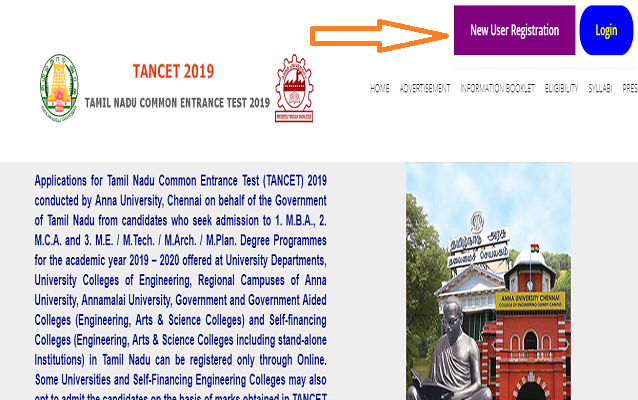
Step 2: In the home page of TANCET 2019, candidates had to click the ‘New User Registration’ tab
Step 3: Enter name, initials, mobile number, email ID and password. Remember your password should be minimum of eight characters.
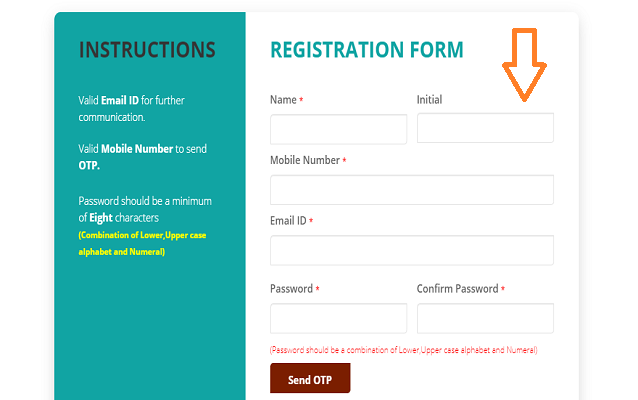
Step 5: You received their OTP on phone
Step 6: Enter the OTP and click on ‘Submit’ button
Step 7: A message showing ‘Registration is successful’ appeared on the screen
Latest: TANCET 2019 Login to download result - Check here
How to access TANCET login?
Candidates can follow the below-mentioned steps to access the login page.
- Go the official website
- In home page, click the ‘login’ tab
- TANCET login page will open in a new page as given below
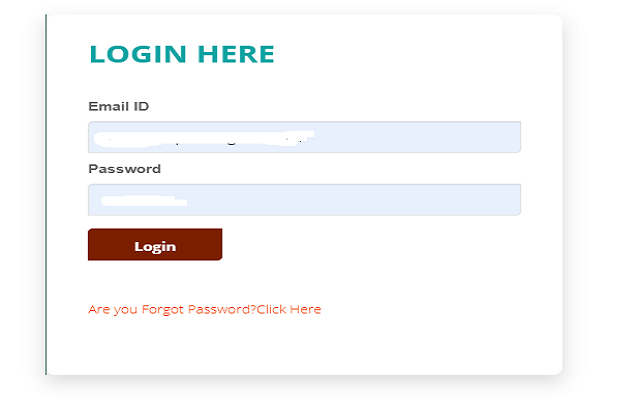
- Candidates need to enter email ID and password
What if I forget the password?
If candidates forget their password while logging, they need to click the ‘Forget Password’ tab just below the TANCET login page. Candidates need to enter their email ID and mobile number. Candidates will get their new password.
TANCET 2019 Login for Counselling
Candidates qualifying the exam will be called for TANCET counselling 2019. To generate the login ID for counselling, candidates need to follow the steps below -
- Visit the official website of Counselling authority
- Select the ‘Register Online Application’ tab
- Fill the mandatory fields marked in red
- Candidates need to select the type of course (MBA/MCA)
- Candidates need to provide email ID and mobile number
- The password will be sent to the registered email ID and mobile number
- Provide valid TANCET 2019 hall ticket number and normalised marks in the application form
- Click on ‘Submit’ tab
What are uses of TANCET 2019 Login?
The login of TANCET is used for the following purposes –
- Filling up TANCET application form 2019
- For TANCET application correction
- Candidates will required TANCET 2019 login to download the hall ticket
- To download TANCET 2019 answer key, candidates will require the login details
- The login will be required to check TANCET result 2019 and rank card
Read More
News & Updates
Photos & Videos



+23
- B Tech (Bachelor of Technology)
- MBA (Masters of Business Administration)
- M.E./M.Tech
- BSc
- B.Arch (Bachelor of Architecture)
- MSc (Master of Science)
- Ph.D.
- M.Arch (Master of Architecture)
- BBA (Bachelor of Business Administration)
- B.Plan
- Social Responsibility
- M.Plan (Master of Planning)
- Engineering
- IT Software Courses
- Business & Management Study
- Science Subject
- Architecture & Planning
- Banking, Finance & Insurance
- Hospitality & Travel
- Aviation
- Top Colleges Colleges in Chennai
- Top Mass Communication Colleges in Chennai
- Top Private Medical Colleges in Chennai
- Top SDGs Institutions Colleges in Chennai
- Top Government Engineering Colleges in Chennai
- Top Private Fashion Design Colleges in Chennai
- Top Private Hotel Management Colleges in Chennai
- Top Open University Colleges in Chennai
- B.Tech colleges in Chennai
- M.Tech colleges in Chennai
- MBA colleges in Chennai
- Certificate colleges in Chennai
- M.Sc. colleges in Chennai
- Ph.D. colleges in Chennai
- M.Arch colleges in Chennai
- B.Sc. colleges in Chennai
- MCA colleges in Chennai
- B.Plan colleges in Chennai
- M.Plan colleges in Chennai
- B.Arch colleges in Chennai
- M.Phil colleges in Chennai
- Engineering colleges in Chennai
- IT & Software colleges in Chennai
Contact Details
Address
Anna University, Sardar Patel Road
Guindy, Chennai ( Tamil Nadu)
Get details of Similar Colleges

Student Forum
 Anything you would want to ask experts?
Answered a month ago
Lovely Professional University (LPU) offers B.Tech programmes with a strong focus on career development, industry exposure and placement preparation. Students from different B.Tech specializations, including Computer Science and Engineering, Electronics and Communication Engineering, Mechanical Engi
P
Contributor-Level 10
Answered Yesterday
Passing CEETA PG is not enough. You have to obtained a good rank for getting admission here.
Scholar-Level 18
Answered 5 days ago
Yes, the Madras Institute of Technology (MIT Chennai) offers various government, institutional, and merit-cum-means scholarships. Institutional scholarships (such as specific branch-based awards providing up to INR 45,000 per year) are offered for first-year and senior students in select departments
G
Contributor-Level 10
Answered 2 weeks ago
Top recruiters at the College of Engineering, Guindy (CEG) Anna University include companies like Google, Microsoft, Amazon, Oracle, Cisco, TCS, Infosys, Wipro, Cognizant.
A
Contributor-Level 10
Answered 2 weeks ago
I am sharing you steps below to get a seat for IE at Anna via ICCR.
- Check your ICCR Admission to Alumni (A2A) portal daily for offer letters.
- Accept the Offer Immediately on the portal within the specified deadline (usually 7 days).
- You can email the Center for International Relations (CIR) at Anna Uni
A
Contributor-Level 10
Answered 3 weeks ago
MIT Chennai offers scholarship to BC/MBC, SC/ST & SCC Students. Check below eligibility to avail the scholarship:
- Income certificate from Tashildar office is must.
- Parental Annual Income should be below INR 2.5 Lacs for BC/MBC & SC/ST
- Parental Annual Income for SCC Students should be below INR 2 lakh.
- F
G
Contributor-Level 10
Answered 2 months ago
The total fee for MCA course is INR 2.11 L at this college.
This amount includes Tuition fee, one-time payment, hostel, etc. See the complete breakdown as per official sources below. Please know that the amount is subject to change.
| Components | Amount (for 2 years) |
|---|---|
| Tuition | ₹ 36 K |
| Hostel | ₹ 1.49 L |
| One-time Payment | ₹ 16.66 K |
| Other Fees | ₹ 9.16 K |
| Total fee | ₹ 2.11 L |
N
Contributor-Level 10
Answered a month ago
Anna University, especially its CEG and MIT campuses, is considered the top choice in Tamil Nadu, requiring very high cutoff marks around 198-199. SRM is seen as a strong alternative but is generally ranked a notch below Anna University's main campuses. The answer suggests competition for Anna Unive
T
Contributor-Level 10