

The NEST 2026 application process is over. The NEST application process was completely online. Students can read this article on Shiksha, which brings the step by step process on how to fill NEST 2026 application form.

How to Fill NEST 2026 Application Form
The NEST 2026 application processis over. The application form was available online from January 5 to April 8, 2026. Conducted for the admission to NISER Bhubaneswar and University of Mumbai, Department of Atomic Energy, Centre for Excellence in Basic Sciences (UM-DAE CEBS). Students planning to apply for the NEST 2026 exam must not wait till the last moment to complete the process.
The NEST application process was completely online. Students who have yet to fill up the form should read this article on Shiksha brings the step by step process on how to fill NEST 2026 application form. Along with that, students can also know about the other important elements of the exam.
- NEST 2026 Overview
- Pre-requisites to Fill NEST 2026 Application Form
- How to Fill NEST 2026 Application Form
- NEST 2026 Application Form Instructions
- NEST 2026 Registration Process
- Details to be Filled in NEST 2026 Application Form
- NEST 2026 Application Fee Payment

NEST 2026 Overview
The following table brings the key details about the NEST 2026 exam.
| Particulars |
Details |
|---|---|
| Exam Name |
National Entrance Screening Test |
| Conducting Body |
NISER Bhubaneswar and UM-DAE CEBS Mumbai |
| Exam Level |
Undergraduate Exam at the National Level |
| Exam Frequency |
Once a Year |
| Mode of Exam |
Online or Computer-Based Test |
| Courses Offered Through Entrance Exam |
Integrated MSc |
| Exam Fees |
INR 1,400 (Male candidates of General and OBC categories) INR 700 (Female candidates of all categories and male candidates of SC, ST and PwD categories) |
| Exam Duration |
3 hours |
| Total Marks |
240 |
| Total Number of Questions |
60 |
| Marking Scheme |
+3 for each correct answer -1 for each wrong answer 0 for unanswered questions |
| Language/Medium of Questions |
English and Hindi |
| Colleges Accepting NEST Score |
2 colleges |
| Total Number of Seats |
261 |
| Number of Exam Cities |
140 |
| Official Website |
https://www.nestexam.in/# |
| Contact Details |
Helpline Number - 0674-2494017 Email - nest-exam@niser.ac.in |

Commonly asked questions
For each section, "20% of the average of the best 100 scores in that section" will be considered as the section–wise Minimum Admissible Score (SMAS).
For example, if the average of the best 100 scores in the Chemistry section is 43 out of 50, then SMAS for the Chemistry section would be 43*0.20 = 8.6 marks. It will be same for other section too.
SMAS for the two sessions, for any particular section, can be of different numerical values. The value of SMAS will be different for different category students i.e if it 100 for General candidates then it will be 90 for OBC and 50 for SC/ST and Divyangjan applicants.
Applicants are allowed to fill the three exam city choices while filling the application form of NEST exam. NEST 2026 will be conducted in 140 cities. Candidates have to enter the city names as per their preferential order, near their present address.
The NEST 2026 application form was released on January 5, and continued till April 8. The application process is completely online. The application correction facility was available from April 18 to April 19, 2026.
Applicants who have forgotten the login details of the NEST exam admit card should first check their mobile/email ID as after registration, a message comes from the authorities.
Candidates can also recover the password of their NEST account by clicking on the 'Forgot Password' button at the bottom of the login window. This password will be sent to the NEST-registered email of the candidate. By clicking on the link, applicants can recover their password, and after tha,t they can download their admit card
Pre-requisites to Fill NEST 2026 Application Form
Before starting the NEST registration and application process, candidates have to keep the following resources and information ready.
- A properly functioning desktop or laptop computer system
- Stable internet connection
- Compatible internet browsers - Mozilla Firefox (94 to 113), Chrome (88 to 113), Microsoft Edge (88 to 113)
- The NEST 2026 application form is compatible to mobile operating systems – Android (version 4.0 and above), and iOS (version 9 and above)
- Active mobile number and email address
- Class 10 Board Exam Roll Number or Registration Number
- Scanned copy of photograph and signature
- Payment mode details and credentials

How to Fill NEST 2026 Application Form
Now we come to the important section of the article, how to fill the NEST 2026 application form.
- Visit the official website, i.e. nestexam.in
- Click on the tab Register Now or directly click on the link - https://cdn3.digialm.com/EForms/configuredHtml/1834/97119/Registration.html
- Read the instructions carefully
- Fill up the mandatory fields
- Generate Username and Password
- Login with the registration details
- Fill up the application form and upload documents
- Pay the application fee through Credit Card, Debit Card, Net Banking and UPI modes
- Once the registration form is submitted then students must take a printout and save it for further usage.
Commonly asked questions
Applicants who want to appear for the NEST exam need to download the admit card to appear in the examination. Applicants are required to first check whether they are using the recommended browser or not for downloading the NEST 2026 admit card. After that they also need to have an active internet connection at their place before downloading the admit card.
Students need to enter their user ID & password, followed by entering the Captcha if mentioned on the login portal. After entering these details, the admit card will be opened in a new window. Now save the copy for future reference.
The exam conducting authorities will release the admit card at least two weeks before the commencement of the exam. The NEST hall ticket will mentionthe following details of the applicants
- Application Number
- Roll Number
- Candidate's Name
- Candidate's Address
- Date
- Time
- Shift
- Reporting time
- Venue and Emergency contact number
In case of any discrepancy in the details mentioned in the admit card, applicants need to immediately connect to the exam conducting authorities by the Emergency number mentioned in the admit card.
Applicants who want to appear in the NEST exam need to carry an admit card. Applicants are not advised to carry any other document. Candidates need to carry only a valid photo ID proof along with the admit card on the NEST exam day.
Students need to check all the details mentioned in the admit card. If any information is not correct, then applicants need to immediately contact the exam conducting authorities and get it rectified.
The hall ticket for NEST 2027 will be released by the exam authority, NISER, Bhubaneswar. Applicants who successfully fill the application form will be able to download the admit card by entering their login credentials. i.e user ID and password.
Explore colleges based on NEST

- Chat with our counselor
- Get your personalised list of colleges & exams matching your preferences
NEST 2026 Application Form Instructions
Prior to starting the NEST 2026 registration process, candidates should go through the instructions carefully.
- Fields marked with * are mandatory
- Fill in the details and click on Register to proceed
- Please read the Prospectus carefully before registering
- After successful registration you will receive User ID and Password to the registered Mobile number and Email ID.
- Mobile Number and Email ID can be used only once.
- Login link will be sent to the registered Email ID.
- Click on the login link to fill the application.
NEST 2026 Registration Process
The first step of the NEST 2026 application process is to register for the exam. To register, candidates have to fill in the following information.
- Applicant Full Name, as mentioned in Class 10 Board exam admit card
- Date of Birth (in DD/MM/YY format)
- Class 10 Roll Number or Registration Number
- Year of Passing Class 10 (select from dropdown menu)
- Gender
- Mobile Number
- Email ID
- Enter the OTP sent on the registered email address
- Read the declaration and click on ‘I Agree’ checkbox
- Enter the captcha
- Click on Reverify
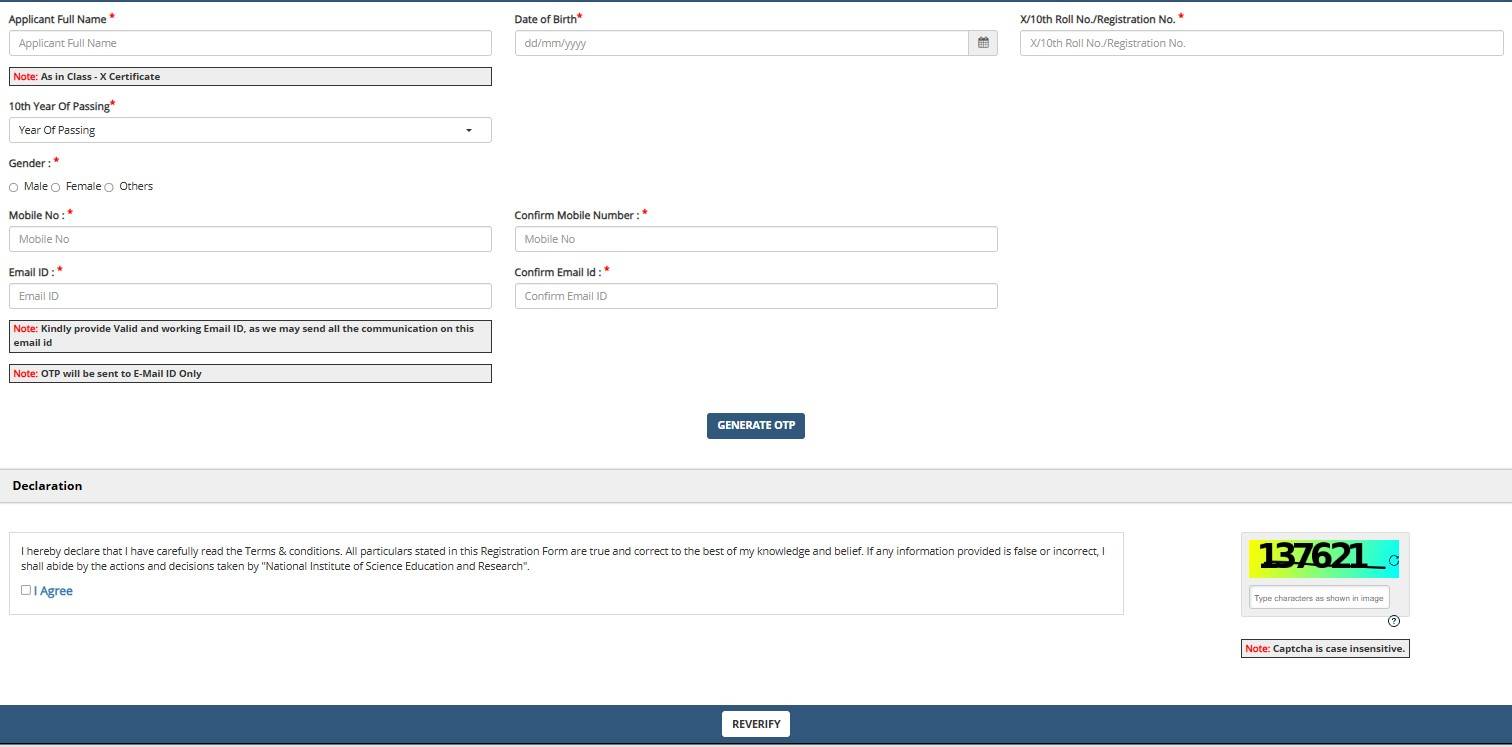
The registration credentials will be sent to candidates’ email addresses. This also acts as the registration confirmation.
Commonly asked questions
You have to provide the login credentials to download the admit card of NEST. The exam authority will activate the NEST admit card link on the website. The steps to download the NEST admit card is mentioned below.
- Go to NEST 2027 website.
- Click on the admit card link.
- Enter the required credentials.
- Access the admit card and take a print of the same.
Candidates have to choose three exam cities in preferred order while filling the NEST application form. The exam centre will be allotted as per their preference.
A good score in NEST is considered to be 150+ marks. However, NEST safe score varies for each categories. To secure admission to the top programs offered at NISER and UM-DAE CEBS candidates belonging to GEN category must obtain 150+ marks, while SC/ST need to obatin 90+ marks.
Details to be Filled in NEST 2026 Application Form
After completing the registration process, candidates have to log in with their Application Number and password. After that, the application form will open. The basic personal information will be auto-filled, which were entered during the registration process.
The NEST 2026 application form will be divided into the following sections:
- Personal Details
- Qualification Details
- Document Upload and
- Fee Payment
Now, we will see the information to be entered in each of these sections.
Personal Details
The following information are to be entered in this section of the NEST application form 2026.
- Father’s/Mother’/Spouse’s Name
- Category
- Are you from J&K Domicile?
- Have you appeared/appearing 12th Standard in J & K/Ladakh?
- Status of Physical Disability, if yes, then category and scribe requirement
- Details of guardian – Name, relationship, and mobile number
- Present and Permanent Address
Qualification Details
In this section, applicants have to enter Class 10 and Class 12 Board exam details. The information to be entered are as follows:
- Name of Board/Council
- Year of Passing
- Percentage of Marks
Document Upload
This section includes two sub-sections, exam city selection and document upload. Candidates have to select three exam cities in preferred order. The NEST 2026 exam centre will be allotted based on the preferences. “Students will be allotted as per their 1st preference as far as possible. However in case of unavailability of nodes in the City of 1st Preference, 2nd and then 3rd choices will be considered. In extreme cases, candidates will be allotted to the nearby available centres. The centres printed on the admit card will be final,” authorities have stated.
Documents to be uploaded
The following table brings the list of documents to be uploaded along with the format and sizes.
| Document Type |
File Size |
File Format |
|---|---|---|
| Photograph |
Up to 200 KB |
JPG or JPEG |
| Signature |
Up to 200 KB |
JPF or JPEG |
| J&K Domicile Certificate (if applicable) |
Up to 80 KB |
|
Explore more Science exams with upcoming dates

1 Nov '25 - 29 Sep '26
3 Oct '26
7 Jan '27
24 Sep '26
18 Sep '26 - 25 Sep '26
31 Mar '27
NEST 2026 Application Fee Payment
The final step is to pay the NEST 2026 application fee. The category-wise fee is given below.
| Category |
Fees (in INR) |
|---|---|
| Male candidates of the Unreserved/ EWS/OBC category |
1,400 |
| Female candidates in the Unreserved/EWS/OBC category |
700 |
| SC/ST/PwD/ category candidates |
700 |
The fee has to be paid through online mode only, which is Credit Card, Debit Card, Net Banking and UPI modes.
After successful payment of fees, candidates will get confirmation through email. They are advised to save a take printout of the same till the admission process is over. The NEST 2026 exam was conducted on June 6, 2026.
Read More:

News & Updates
Explore Other Exams
9 Sep '26 - 12 Sep '26 | Round 9 Counselling |
5 Sep '26 - 7 Sep '26 | Round 8 Counselling |
11 Sep '26 - 12 Oct '26 | IIT JAM 2027 Application Proce... |
Nov '26 | IIT JAM 2026 Form Correction |
Jul '25 | ITM NEST 2025 Result Date |
Jun '25 | ITM NEST 2025 Exam date |
1 Aug '26 | TIFR GS 2026 Session Starts |
Feb '26 | TIFR GS 2026 Final Result |
Student Forum
 Anything you would want to ask experts?
Answered 3 months ago
NEST 2026 result was declared on June 24, 2026. The result applies only to the current academic year 2026-27.
V
Contributor-Level 10