

NIELIT Application Form 2026: The NIELIT 2026 registrations for the June session is expected to start soon. Candidates meeting the official eligibility criteria will be able to apply for the exam. While filling out the NIELIT 2026 Online Examination Application Form, candidates will have to enter their details and select their preferred exam centres.
The NIELIT 2026 OEAF processing fee for O/A/B/C is expected to be same as the January cycle which was INR 100 in addition to the requisite fees for the applied theory/practical modules. Candidates will have to pay the fee online via net banking/credit card/debit card, or CSC services for the NIELIT 2026 O/A/B/C courses. Read to know more about the NIELIT 2026 Application Form.
- NIELIT Application Process 2026
- NIELIT 2026 Important Dates
- How to fill NIELIT 2026 O/A/B/C Online Examination Application Forms (OEAF)?
- Steps to register for NIELIT 2026 O/A/B/C Level Exam
- NIELIT 2025 Application Fee
- NIELIT Exam: Important notes
- NIELIT 2026 Application Form Highlights


NIELIT Application Process 2026
NIELIT 2026 Online Examination Application Forms (OEAF) filling window for the O/A/B/C June session exam will start soon.
- A valid registration number (name and DOB exactly as in the Registration Allocation cum Identity Card issued by NIELIT).
- Personal Email ID of the candidate, not of the institute, for validations and future correspondence.
- Personal mobile number of the candidate for correspondence.
- Scanned latest passport-size photograph, signature & LTI (Left Thumb Impression); all in jpeg format, size limited to 50 KB each.
Steps to fill out the NIELIT Application Form
Please check the below steps to fill the NIELIT application form:
1. Create an account.
Go to the New User? (registered candidate) link provided below the Login box, to the right-hand side of the official website. The following screen will appear:
- Enter your current course details to start new user registration process
- Current course (in which a candidate is registered)
- Registration Number ( of the course selected above)
- Name of the candidate
- Date of Birth
- Captcha
After filling the above information, press the Next button. The data will be verified, and then you will be prompted to complete the next step.
Step 2: Email ID & Mobile Number Verification
- Candidate Name
- Enter Email Address
- Enter Mobile Number
After filling out the above information, press the next button. A candidate will be asked to enter a user ID and create a password. Also, the candidate will be prompted to select a security question and enter the security answer, which will be used to recover the password, in case he or she forgets it in the future.
Step 3: User Creation
A screen will appear in which the below-mentioned information needs to be filled out by a candidate:
- Candidate Name
- User Name/ID
- Create a new password.
- Confirm the new password.
- Security Question
- Security Answer
After successful completion, the user ID and Password will be sent to the email address of the candidate. It is to be noted that account activation is mandatory to log in to the Online Student Information and Enrolment System of NIELIT. Once the account is activated, candidates can click on the login page link. After a successful login, it will direct the candidate to the My Dashboard.
2. Update Profile
On the dashboard, a candidate may get the following notifications, depending on the details about their availability in records:
Profile Notification
- Your profile photo/signature/left thumb impression has not yet been uploaded.
- Your correspondence address details are not completed yet.
Check out the instructions below to complete your profile details. Scanned images properly for uploading. Ensure size and format, too.
Step 1: Upload Photograph, Signature & LTI
- Upload Photograph (JPG, JPEG, GIF, PNG image with size up to 50 KB )
- Upload Signature (JPG, JPEG, GIF, PNG image with size up to 50 KB )
- Upload Left Hand Thumb Impression (JPG, JPEG, GIF, PNG image with size up to 50 KB)
After uploading, click on the preview. Make sure that all the details are displayed correctly. It is to be noted that once the details are updated, they cannot be modified. If sure, click on Update, and then go back to the Dashboard.
Step 2: Update Your Mobile Number
Click on the Please verify your Mobile Number link. An OTP (One Time Password) will be sent to the candidates. Enter the OTP number in the given box.
The OTP number must correspond to the OTP reference number, usually the latest SMS is the valid one. Click on Validate after putting the OTP number in the box. If a candidate does not receive any SMS for a reasonable time, he or she may click on the Resend button. Go to My Dashboard. Click on the link for updating candidates' Correspondence Address Details.
Step 3: Update Correspondence Address Details
- Address Line1
- Address Line2
- Address Line3
- City
- District
- State
- Pin Code
After completing it, go to My Dashboard.
Step 4: Update Personal Details
- Father’s Name
- Mother’s Name
- Guardian’s Name
- Candidate’s Gender
After completing it, again go to My Dashboard.
Step 5: Lock Profile
If a candidate finds no pending profile notification, then lock the profile. Lock the profile only after ensuring that the details entered are correct and current. Note that once a candidate locks the profile, he or she cannot modify it any more. Further, unless a candidate locks his or her profile, he or she can not apply for any NIELIT Examination Online. After locking the profile, a full screen will display to check the whole profile once again. At the top of the right-hand side, the "Lock Profile" button is there.
It will display a full-screen view of your profile. The top RHS candidate will get a “Lock Profile” button. Another page with a warning will be displayed, at the bottom of which a candidate will have to click the Confirm Lock button to confirm that the details entered are correct and ready for locking. Still, another message will ask a candidate for confirmation.
3. Fill out the application form
Go to the Course tab. Click on Apply Online available on the right-hand side border. On the screen, the application form will appear for the ongoing Examination. Please note that the field marked with is mandatory. It has five major points, such as Exam Details, Exam Centre Details, Modules Appearing, Fee Details and Declaration.
The candidate will be sent an email and SMS informing them of the Application Number, which should be preserved for future use. Also, the Candidate will be given a Demand Note Number with the fees to be paid.
4. Fee Payment
While filling the Application Form, the candidate can opt to pay the applicable fees him/herself or opt for the Accredited Institute will pay the fee on his/her behalf. If the candidate has chosen to pay the fees him/herself, s/he have many alternatives with different service charges available as under. It may be noted that the service charges are not included in the total fees that were calculated during the filling of the form. It will be collected by the service provider separately from the candidate.
To pay the fee, a candidate can choose the CSC-SPV Service or pay through an online payment service.
Also Read: Top AI (Artificial Intelligence) courses through NIELIT

Commonly asked questions
No, a candidate can only register for one level at a time. Candidates must clear their current level (O, A, B, or C) before moving to the next level.
NIELIT OEAF stands for the Online Examination Application Form, which has to be filled out by the registered candidates to appear in the entrance exam. In addition to registration, the candidates will also need to fill out and submit the NIELIT OEAF before the last date. Application fee for NIELIT OEAF is INR 100 along with the mandatory fees for the Theory/Practical modules applied
NIELIT 2026 O/A/B/C January cycle application forms were available around September-October 2025. NIELIT 2026 O/A/B/C courses January cycle applications are now over. No applications will be accepted after the NIELIT 2026 application form deadline. All proper and valid details had to be entered in the NIELIT 2026 application form for O/A/B/C courses.
NIELIT 2026 Important Dates
Take a look at the table below for the complete schedule of NIELIT Exam 2026 exam
| Dates | Past Exam Dates |
|---|---|
| 07 Feb ' 26 | Commencement of Practical Examinations |
| 10 Jan ' 26 | Commencement of Theory Examinations of 'O'/'A'/'B'/'C' Levels |
| 03 Nov ' 25 - 15 Nov ' 25 | O/A/B/C Level Examinations Online Examination Application Forms (OEAF) Submission |
How to fill NIELIT 2026 O/A/B/C Online Examination Application Forms (OEAF)?
Candidates can access the NIELIT 2026 Online Examination Application Forms (OEAF) at student.nielit.gov.in. They can seek assistance from the Common Service Centre (CSC) to complete the form and pay the fee. Follow below steps to fill the NIELIT application form.
- Go to student.nielit.gov.in
- Click on the user login
- Log in using your User ID and password.
- Select your preferred course
- Fill details and upload the scanned documents as prompted
- Pay the application fee for NIELIT 2026 examination online, i.e., through net banking/credit card/debit card. Payment can also be done through CSCs.
NIELIT 2026 Online Examination Application Forms (OEAF) Fee - INR 100 in addition to the requisite fees for the applied Theory/Practical modules.
Commonly asked questions
The NIELIT Online Examination Application Forms (OEAF) fee is INR 100 in addition to the requisite fees for the applied Theory/Practical modules. The required fee has to be paid online i.e., through net banking/credit card/debit card or through CSCs. If the fee is not paid before the final date, then the candidates will not be allowed to attempt the examination.
No, a candidate can only register for one level at a time. Candidates must clear their current level (O, A, B, or C) before moving to the next level.
Yes, the candidates will be able to seek the Common Service Centre services to fill out the NIELIT Online Examination Application Forms (OEAF). The required examination fee can also be paid through the CSC services. Candidates are advised to complete the NIELIT OEAF process before the final date to be registered for the entrance examination of their course.
Steps to register for NIELIT 2026 O/A/B/C Level Exam
Follow below steps to fill the NIELIT application form-
- Visit student.nielit.gov.in and register using your basic details. Registered candidates can log in using their registered email ID and password.
- Verify your mobile number and email ID, and generate a password. Your user ID and password is going to be sent to your registered email address.
- Fill the application form with required personal, academic and contact details. All details must be valid.
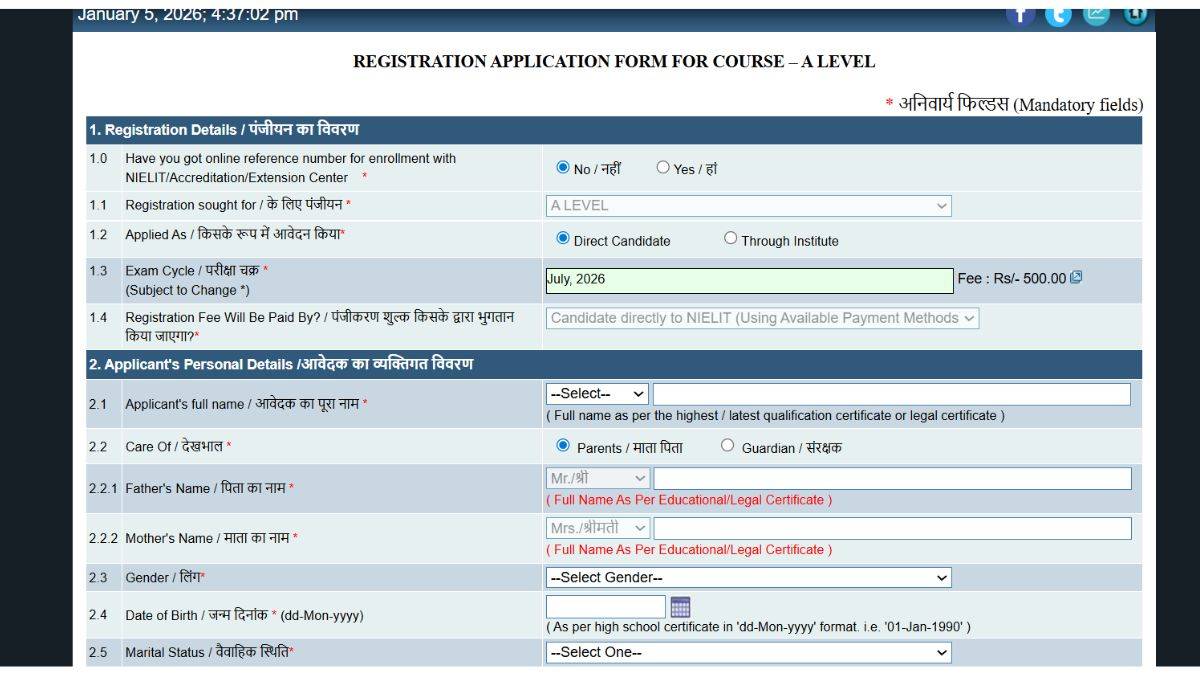
- Upload the documents below.
- Photograph
- Signature
- Left-hand thumb impression
All images should be in the JPG/JPEG/GIF/PNG format, with size of up to 50 KB
- Pay the application fee for NIELIT 2026 online or via Common Services Centres - Special Purpose Vehicle (CSC-SPV)
Commonly asked questions
While registering for NIELIT exam, the candidates will be required to pay the application fee. As per the official notification, the NIELIT application fee for O level is INR 500. All of the candidates will have to pay the NIELIT application fee online i.e., through net banking/credit card/debit card or through the CSC-SPV services. No other mode of payment will be accepted.
To fill the NIELIT application form, upload your scanned passport-size photo and signature. Ensure that the documents you upload meet the specifications of the information brochure. If the specifications are not met, then your documents will not be uploaded and your application will not be submitted.
You can find your assigned NIELIT exam centre on your NIELIT admit card. The NIELIT centre allotment is done basis the candidate's preference.
NIELIT 2025 Application Fee
The NIELIT 2026 application fee for the O/A/B/C level exam can be paid via two modes - online (net banking/credit card/debit card) or offline (through CSC-SPV service). To make a payment through the CSC-SPV service, use the locator to find the nearest CSC. Make the fee payment before the last date to be eligible for the NIELIT exam.
NIELIT Application Fee 2026
| Level | Fee |
|---|---|
| O/A/B | INR 500 |
| C | INR 500 + INR 90 (18% GST) |
NIELIT 2026 Application Fee (Service Charges)
| Particulars | Fee |
|---|---|
| CSC-SPV Service | |
| Cost for online form submission and fee collection | INR 55 |
| Cost for registration fee collection online | INR 20 |
| Online Payment | |
| Internet Payment | INR 5 for transaction amount up to INR 500 INR 10 for transaction amount above INR 500 |
| Debit Card Payment | 0.75% of the transaction amount for value up to INR 2000 1% of the transaction amount for value above INR 2000 |
| Credit Card Payment | 1% of the transaction amount |
Commonly asked questions
There is no specific number as such. However, at each level, a candidate needs to complete the papers within the stipulated period. At NIELIT O/A/B/C levels, candidates can appear in any paper, in any order, if the subject has been covered by the institution running the accredited course and as mentioned on the application form. Candidates can directly appear in examinations if they satisfy the eligibility criteria as applicable to them.
The NIELIT registration fee is non-refundable. The one-time, non-refundable registration fee is neither refundable nor adjustable against any other payments or purposes. The registration process is mentioned in the guidelines mentioned on the Online Student Portal.
NIELIT Exam: Important notes
- Mode of Exam: To be conducted online as a computer-based test.
- Application Window: The window for January 2026 session is closed.
- NIELIT Exam Centre Changes: No changes will be entertained after the application form submission.
- Commencement of Practical Examinations: February 7, 2026
- Tentative date of Declaration of 'O'/'A'/'B'/'C′ Level Results: Last Week of April, 2026
- Marks and Duration: Each theory paper is of 100 marks and has a duration of three hours. Each practical examination is of 3 hours duration and carries 100 marks.
Commonly asked questions
Candidate can check below the steps to apply for the NIELIT.
- Visit the official website and click on 'Apply Online' at student.nielit.gov.in.
- Select the Certificate Course 'O/A/B/C' Level
- FIll the Application Form
- Upload Photograph, Signature and Thumb Impression
- Submit the Application Form
- Note down the Unique Appliction Number
- Take a Print Out of Application Form for Future use
- Also, pay registration fees via Online Payment Option.
NIELIT OEAF stands for the Online Examination Application Form, which has to be filled out by the registered candidates to appear in the entrance exam. In addition to registration, the candidates will also need to fill out and submit the NIELIT OEAF before the last date. Application fee for NIELIT OEAF is INR 100 along with the mandatory fees for the Theory/Practical modules applied
You cant retrieve it. You would need to log in again and submit the online examination application form again. There is no facility for saving the details.
NIELIT 2026 Application Form Highlights
- Candidates should use their personal valid email ID and mobile number for registration.
- There are two types of applicants - Fresh applicants (not registered for any NIELIT O/A/B/C level course) and Registered applicants (already registered for any O/A/B/C course).
- The NIELIT 2026 application fee can be paid online or through CSC-SPV services.
- Candidates will receive the Login ID and password at their registered email address.
Commonly asked questions
NIELIT Examination Centres are located across the country. A list of examination centres will be provided to the candidate once they apply for the examination form through online mode. Students can choose a centre of their choice while filling out the online examination application form (OEAF).
As per the official website, there is no need to send the documents. A declaration is provided by the authorities to the candidates that if they provide any wrong or inaccurate information in Online Registration Application form, they will be responsible for further legal or other consequences.
NIELIT registration application status can be checked in the online student portal at student.nielit.gov.in by providing the registration application number received by a candidate during the filling the Online Registration Application Form (ORAF).
Explore top IT & Software exams
18 Sep '26 | AIAPGET 2026 Final Answer Key |
18 Sep '26 | AIAPGET 2026 Result |
Mar '27 | AP POLYCET 2027 Application Fo... |
Apr '27 | AP POLYCET 2027 Hall Ticket Da... |
26 Jul '26 - 27 Jul '26 | AMUEEE 2026 seat allotment - R... |
22 Jul '26 | AMUEEE 2026 counselling regist... |
27 Aug '26 - 31 Aug '26 | Round 2 - Reporting & Submissi... |
27 Aug '26 - 31 Aug '26 | Round 2 - Online Acceptance of... |
9 Dec '26 | WWI Entrance Exam |
Sep '26 | WWI Application 2027 |
Oct '26 | FTII JET 2026 (Stage 2) Exam |
Nov '26 | Last Date to Pay Seat Acceptan... |
Jul '26 | Delhi CET 2026 Exam Date |
Jun '26 | Delhi CET 2026 Application For... |
Aug '25 | MUJEE 2025 Result announcement |
Aug '25 | Exam date |
24 Sep '25 | WBTET Result |
10 May '24 - 9 Jun '24 | WBTET Answer Key Objection |
31 Oct '26 | Last Date for submitting Quali... |
6 Jun '26 - 13 Jun '26 | JMI Entrance Exam 2026 Counsel... |
Feb '27 | TS POLYCET 2027 Application Fo... |
May '27 | TS POLYCET 2027 Exam Date |
Jul '26 | ISI Admission Test 2026 Counse... |
Jun '26 | ISI Admission Test 2026 Result |
Jan '27 | JEEP 2027 Online Application F... |
Feb '27 | JEEP 2027 Offline Application ... |
31 May '26 | AMU BA LLB Result 2026 |
29 Apr '26 | AMU BA LLB Answer Key 2026 |
Jun '25 | Assam PAT 2025 application for... |
11 Aug '26 | DCECE 2026 Mop-Up Round Seat A... |
26 Jul '26 | DCECE 2026 Revised Round 2 Sea... |
NIELIT Exam Exam
Student Forum
 Anything you would want to ask experts?
1 Institutes accepting NIELIT Exam

Explore more IT & Software exams with upcoming dates
 BIT MCA 2027 Application Form Feb '27 - May '27