

After the candidates register for KEAM, the KEAM login is created. Once the candidates are registered, they can access the KEAM 2027 candidate login portal to register for the exam, download the admit card, check answer keys, results and take part in the KEAM counselling as per the schedule.

KEAM 2027 Login
KEAM 2027 Login: The Commissioner for Entrance Examinations (CEE), Kerala, will activate the KEAM 2027 candidate login window at cee.kerala.gov.in. To create your account, candidates must register before the official deadline by providing your name, date of birth, mobile number, email address, and a unique password.
Once registered, candidates must securely store their KEAM application number and password, as these credentials are required throughout the entire admission cycle. Candidates will need to access this portal frequently for critical milestones, including form correction, downloading hall tickets, checking exam scores and ranks, uploading Class 12 (Plus Two) marks, and participating in the online CAP counseling rounds. Missing access during these stages can disrupt your admission.
- How to Create KEAM Candidate Login 2027
- What to Do if Forgot KEAM 2027 Login Password?
- What to Do if Forgot KEAM 2027 Application Number?
- KEAM 2027 Candidate Login for Application Form Correction Window
- KEAM Candidate Login 2027 for Admit Card Download
- KEAM 2027 Candidate Login for Answer Key Challenge
- KEAM Candidate Login to Check KEAM Results/Rank List/Cutoff
- KEAM Candidate Login 2027 for Counselling Process

How to Create KEAM Candidate Login 2027
Students can create their login during the KEAM 2027 registration process. It is done when you start filling the application form. To generate login details for KEAM 2027, you need to provide the required details. After submitting the details you get KEAM login information.
Functions of the KEAM Candidate Portal 2027
Candidates can use the KEAM candidate login 2027 for:
- Filling up the KEAM application form 2027 and making payment
- Uploading documents and adding courses
- KEAM 2027 application form correction
- Downloading the KEAM admit card 2027
- Answer key challenge
- Checking KEAM result 2027
- Checking KEAM rank 2027
- Checking KEAM cutoff 2027
- Downloading KEAM counselling 2027
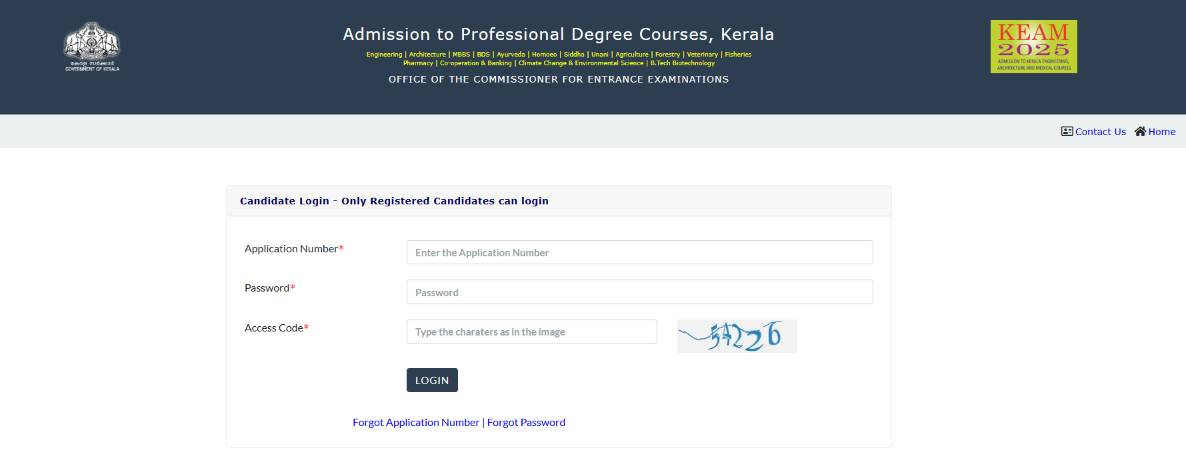
KEAM 2027 candidate login
What to Do if Forgot KEAM 2027 Login Password?
If you forget KEAM login password now need to worry. It is easy to recover. All you need to do is visit KEAM official website which is https://cee.kerala.gov.in/cee/. Then click on the forgot password link. By provide few important details you will receive a verification code on registered mobile number or email id. Finally follow the password reset link to generate a new one.
What to Do if Forgot KEAM 2027 Application Number?
If you don't remember your KEAM application number then follow few simple steps and recover it.
- Visit KEAM official website
- Then click on "forgot application number" link
- You have to provide the details like KEAM candidate login page, enter details like name, date of birth, mobile number, password and case-sensitive access code
- Submit the details and application number will display.


Commonly asked questions
CEE Kerala releases the KEAM question papers along with answer keys every year after the exam. Therefore candidates can download the KEAM previous year question papers from the official website of CEE. KEAM previous year question papers are beneficial for candidates whilst their exam preparation. Moreover, while practising KEAM question papers, candidates can also get an idea of the kind of questions to expect in the exam. It gives the test-takers an understanding of the KEAM exam pattern. Attempting KEAM previous year question papers will help exam aspirants to better their speed and accuracy. It also helps to improve time management skills. Candidates can analyse their performance by solving KEAM question papers from time to time. Boosts the candidate's confidence to ace the exam. Candidates are advised to practice as many KEAM previous year question papers as they can. Candidates can download the KEAM previous year question papers here: https://www.shiksha.com/engineering/keam-exam-question-papers.
Yes, candidates must complete the entire syllabus of KEAM to get a good score in the exam. To get an admission opportunity via KEAM in top colleges, candidates have to prepare for the exam by covering the centre syllabus.
The KEAM syllabus is also provided by CEE, which includes all the topics that candidates have to prepare for the KEAM exam.
- Physics: Bernoulli theorem, Gravitation, Vector, Circular motion.
- Maths: Matrices and Determinants, Application of Derivatives, Vector, Probability, Definite Integration, Functions, 3D Geometry, Differential Equations.
- Chemistry: Polymers, Organic Chemistry.
KEAM 2027 Candidate Login for Application Form Correction Window
CEE open the KEAM form correction window for the registered candidates. Check how to access the KEAM login for form correction below:
KEAM Candidate Login 2027 for Admit Card Download
To download the KEAM 2027 admit card through the KEAM candidate login, follow the instructions. Candidates will need their:
- KEAM registration/application number
- Password
- Access code
The admit card of KEAM will have details like the candidate's name, exam date, KEAM test centre details, roll number etc.
Commonly asked questions
Candidates preparing for KEAM need not buy any book if they already have books from which they prepared for any other MBA entrance exam. However, if KEAM is the only exam for which the candidate is planning to appear, following factors must be kept in mind to choose a book:
- Check the table of content and book edition.
- Check if the book has its content arranged systematically.
- Read reviews whether the book is for advanced level preparation or basic preparation.
- Check if the author and publisher is reliable.
- Does it contain a question bank?
- Does it have section wise distribution?
To prepare using the KEAM syllabus, look for topics you are strong at and topics you are weak at and divide time among these topics. Prepare for the exam accordingly and by prioritising the high weightage topics.
- Revise the important topics.
- Give mock tests to improve your accuracy.
- Solve the previous 5 year papers of KEAM.
- Focus on the graph and diagram.
Candidates can download the KEAM syllabus PDF form the official website of CEE. CEE is the KEAM conducting body. The syllabus of KEAM can be checked and downloaded with the KEAM prospectus. The topics to study for the KEAM exam is the entire syllabus of 10+2 Maths Physics and Chemistry.
The important topics from the syllabus are as follows:
Important Topics in KEAM Physics Syllabus: Introduction & Measurement, Description of Motion in One Dimension, Description of Motion in Two & Three Dimension, Laws of Motion Work, Energy & Power, The Motion of System of Particles & Rigid Body Rotation, Gravitation Mechanics of Solids & Fluids, Heat & Thermodynamics Oscillations, Waves Electrostatics, Optics Solids & Semiconductor Devices, Current Electricity.
Important Topics in KEAM Chemistry Syllabus: Basic Concepts and Atomic Structure, Block Elements, States of Matter Bonding and Molecular Structure, Periodic Properties of Elements & Hydrogen, Basics Principles, Purification & Characterization of Organic Compounds, Hydrocarbons, Coordination Compounds & Organometallics.
Important topics in KEAM Mathematics Syllabus: Sets, Relation & Functions, Complex Numbers, Quadratic Equations, Linear Inequations, 3D Geometry, Differential Equations Application of Derivatives, Indefinite Integrals Lines & Family of Lines, Mathematical Logic & Boolean Algebra Trigonometric Functions & Inverse Trigonometric Functions. Note that these are the important topics only, candidates must study the complete syllabus for the entrance exam.
KEAM 2027 Candidate Login for Answer Key Challenge
The KEAM answer keys challenge window opens under the respective logins of the candidates.
- Candidates who wish to challenge the KEAM answer key must pay a fee of INR 200/- for each question they want to contest.
- Candidates can submit the KEAM answer key 2027 challenge, if any, against answer keys and questions through the KEAM 2027 candidate portal.
- By selecting the applicable links 'Answer Key Challenge (Engineering), Answer Key Challenge (Pharmacy)' in the Candidate Portal, candidates can enter the details about the complaints in the answer key/question.
KEAM Candidate Login to Check KEAM Results/Rank List/Cutoff
CEE Kerala releases the results of KEAM 2027 on its official website. The authority will release KEAM result 2027 in online mode only and will not send any mail. To check the KEAM rank list, candidates have to enter their login details. Here’s how you can check the KEAM rank list 2027:
- Visit the official website of KEAM
- Navigate to the ‘KEAM candidate login portal’
- Enter your KEAM candidate's login details like – the KEAM application number and password
KEAM Candidate Login 2027 for Counselling Process
CEE will conduct the KEAM 2027 counselling process in online mode. Candidates have to register online through the KEAM candidate login window and fill in their required choices. Seat allotment for shortlisted candidates is being held as per the marks obtained in the entrance test, the fulfilment of eligibility and the availability of seats in the colleges of Kerala.
To register for KEAM counselling 2027, follow the steps below:
- Visit the official website of KEAM and click on the candidate login link
- Use the KEAM 2027 application number and password.
- After logging in, enter the key number and password and click on the submit button
- Access the key number (16 digits alphanumeric code) from the security card
After registration, candidates will have to fill in their choices from the list of colleges and courses. The trial allotment process will be conducted by the authorities for only those candidates who have registered. The final seat allotment process will be made through a single-window system of the Centralized Allotment Process (CAP).
Read more:

Commonly asked questions
No, candidates appearing for KEAM for engineering admission, can not skip the Math section.
Although plus two and KEAM syllabus are almost the same, however, some extra effort must be put to prepare for KEAM exam. Candidates can refer to the KEAM previous year question papers and follow the KEAM syllabus to prepare for the exam alongwith the plus two exam preparations.
KEAM was an offline exam until 2023. Candidates had to attempt the exam in pen and paper mode. All entries in OMR answer sheet are to be made with blue or black ink BALL POINT PEN only. However, from 2024 onwards, KEAM transitioned to CBT mode.
The KEAM exam is generally considered to be of moderate difficulty, making it easier than JEE Main. Chemistry is easy, Physics and Mathematics are moderate to tough.
Explore more B.Tech exams with upcoming dates
MET


1 Jul '26 - 10 Oct '26
24 Oct '26
30 Oct '26
30 Oct '26
1 Jun '26 - 31 Oct '26
31 Oct '26
7 Nov '26
10 Nov '26
6 Jan '27
Commonly asked questions
KEAM - Kerala Engineering Agriculture Medical. First, know syllabus completely and then start preparation. It will help you to have a clear mind while preparing. Manage your time efficiently in such a way that you spend equal time for all subjects.
Choose best study materials for your preparations. You may use NCERT books for PCM concepts while Arihant books for practice, H. C. Verma for Physics, O. P. Tandon for Chemistry, And TMH books for Mathematics.
You can also solve sample papers for better preparations. You need to solve last year’s question papers or mock test. It helps you to know about exam pattern or type of questions will come in examination. You can also test your speed & knowledge by solving sample papers.
A list of Course-College combinations available for allotments through the KEAM CAP will be displayed on the Option Registration page of the candidate based on the stream (s) the candidate is eligible for. For example, a candidate included only in the Engineering stream will see the Engineering courses together with the corresponding two-letter codes (Eg:- AE - Applied Electronics and Instrumentation, EC - Electronics and Communication Engineering etc.). Similarly, a candidate in the Medical Stream will see the Medical courses together with the corresponding two-letter codes (Eg:- MM-MBBS, MD-BDS, BA-BAMS etc.). A candidate eligible for both Engineering and Medical streams will see both Engineering and Medical courses. All the Colleges under the stream (s) applicable to the candidate will be shown with their respective three-letter codes (Eg:- TVE-College of Engineering, Thiruvananthapuram, TVM-Government Medical College, Thiruvananthapuram etc.).
All eligible options of the candidate will be displayed on the KEAM Option Registration Page. The candidate may follow the directions given therein to register the options. The data entered may be saved regularly by clicking the ‘Save’ button, so that the data already entered is not lost due to unexpected reasons.
The candidate should enter only those options in which they are interested. Candidates should also note that they will be considered for allotment only to those courses and colleges opted by them. So, a candidate who has not opted for a course-college combination will not be considered for allotment for that combination. Existing options, registered by the candidate which is available in the Option Registration Page, can be cancelled by clicking on the corresponding 'Delete' button. Changes (including deletions) made in the option list must be saved (by clicking on the SAVE button) before leaving the option registration page.
All the valid options registered by the candidate will be processed. If a candidate gets allotted a particular seat, based on his/her option, he/she is bound to accept it, failing which, they will lose that allotment as well as all the existing options in the stream to which the allotment belongs. The options once lost will not be available in the subsequent phases.
Explore colleges based on KEAM
Want better recommendations?
There is a 90% more chance of getting best college recommendations by sharing preferences.
- Chat with our counselor
- Get your personalised list of colleges & exams matching your preferences

News & Updates
Explore Other Exams
19 Aug '26 - 20 Aug '26 | TS EAMCET 2026 MPC Counselling... |
12 Aug '26 - 17 Aug '26 | TS EAMCET 2026 MPC Counselling... |
9 Aug '26 | CG PET 2026 counselling merit ... |
1 Aug '26 - 6 Aug '26 | CG PET 2026 counselling regist... |
Nov '26 | AEEE 2027 Phase 1 Registration... |
Jan '27 | AEEE 2027 slot booking |
25 Sep '26 | BiPC Final Phase Seat Allotmen... |
21 Sep '26 | Third Round Seat Allotment |
Dec '26 | SITEEE 2027 Application Form |
Apr '27 | SITEEE 2027 Admit Card - Test ... |
22 Sep '26 | WBJEE JELET 2026 Seat Allotmen... |
18 Sep '26 - 20 Sep '26 | WBJEE JELET 2026 Counselling R... |
Student Forum
 Anything you would want to ask experts?
Answered 4 weeks ago
TKMCE KEAM cutoff 2026 ranged from 1596 for BTech CSE and 8758 for BTech in Civil Engineering for the General HS category in the last round. For this category, the top three most difficult and the easiest courses are listed below as per the last round closing ranks. Please note that different catego
N
Contributor-Level 10
Answered 4 weeks ago
As per the past three years' cutoff trend, TKM College of Engineering KEAM cutoff is generally released for 2 rounds of admission. In the first round, the maximum admissible rank was 7792 (BTech in Civil Engineering), and in the last round, it was 8758 for the BTech in Civil Engineering course.
N
Contributor-Level 10
Answered 2 months ago
Yes, in some cases. Many private engineering and arts colleges in Kerala also accept direct admission based on Class 12 marks under management quota. However, top government colleges and NITs strictly need KEAM or JEE scores, so check each college's own admission rule.
T
Contributor-Level 10
Currently - Deputy Manager, Content
Role - News and Feature Writer, Content Editor
Expertise - Engineering Education and Counselling
Mamona Majumder specialises in news and feature writing and content editing. With
Read Full Bio