KEAM 2026 Candidate Portal Login: Result OUT at cee.kerala.gov.in
Kerala Engineering Agricultural Medical Entrance Exam 2026 ( KEAM )


KEAM 2026 counselling option confirmation/rearrangement for BTech - Round 2
13 Jul '26 - 16 Jul '26


After the candidates register for KEAM, the KEAM login is created. Once the candidates are registered, they can access the KEAM 2026 candidate login portal to register for the exam, download the admit card, check answer keys, results and take part in the KEAM counselling as per the schedule.

KEAM 2026 Login: The Commissioner for Entrance Examinations (CEE), Kerala, has released the KEAM result under the candidate login at cee.kerala.gov.in. All registered candidates can access the KEAM login 2026 to check their scores.
To access the KEAM 2026 candidate login, candidates have to use their KEAM application number and password. Note that only the registered candidates can access the KEAM candidate login. The candidates must keep the KEAM application number and password safe until the admission process is completed. The KEAM login has to be accessed at various stages during the KEAM admission process, like checking scores, ranks, submission of plus two scores and counselling. To know how to access the KEAM login and more details about it, read below.
LATEST: cee.kerala.gov.in Crashes Following KEAM Result 2026 Link Activation; Here's What Students Should Do
KEAM 2026 Candidate Portal Login Link - Result OUT
Candidates can check the KEAM login link below:
KEAM 2026 candidate login for result: https://cee.kerala.gov.in/keamonline2026/login
- KEAM Candidate Login to Check KEAM Results/Rank List/Cutoff
- KEAM Candidate Login 2026 for Counselling Process
- Functions of the KEAM Candidate Portal 2026
- KEAM 2026 Candidate Login for Application Form Correction Window
- KEAM Candidate Login 2026 for Admit Card Download
- KEAM 2026 Candidate Login for Answer Key Challenge
- What to Do if Forgot KEAM 2026 Login Password?
- What to Do if Forgot KEAM 2026 Application Number?
- How to Create KEAM Candidate Login 2026

KEAM Candidate Login to Check KEAM Results/Rank List/Cutoff
CEE Kerala releases the results of KEAM 2026 on its official website. The authority will release KEAM result 2026 in online mode only and will not send any mail. To check the KEAM rank list, candidates have to enter their login details. Here’s how you can check the KEAM rank list 2026:
- Visit the official website of KEAM
- Navigate to the ‘KEAM candidate login portal’
- Enter your KEAM candidate's login details like – the KEAM application number and password
KEAM Candidate Login 2026 for Counselling Process
CEE will conduct the KEAM 2026 counselling process in online mode. Candidates have to register online through the KEAM candidate login window and fill in their required choices. Seat allotment for shortlisted candidates is being held as per the marks obtained in the entrance test, the fulfilment of eligibility and the availability of seats in the colleges of Kerala.
To register for KEAM counselling 2026, follow the steps below:
- Visit the official website of KEAM and click on the candidate login link
- Use the KEAM 2026 application number and password.
- After logging in, enter the key number and password and click on the submit button
- Access the key number (16 digits alphanumeric code) from the security card
After registration, candidates will have to fill in their choices from the list of colleges and courses. The trial allotment process will be conducted by the authorities for only those candidates who have registered. The final seat allotment process will be made through a single-window system of the Centralized Allotment Process (CAP).
Functions of the KEAM Candidate Portal 2026
Candidates can use the KEAM candidate login 2026 for:
- Filling up the KEAM application form 2026 and making payment
- Uploading documents and adding courses
- KEAM 2026 application form correction
- Downloading the KEAM admit card 2026
- Answer key challenge
- Checking KEAM result 2026
- Checking KEAM rank 2026
- Checking KEAM cutoff 2026
- Downloading KEAM counselling 2026
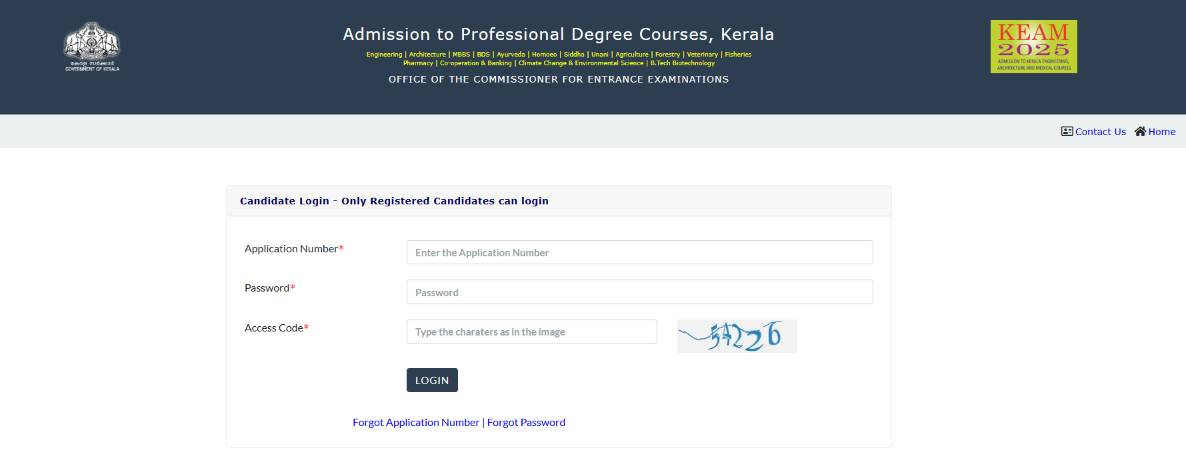
KEAM 2026 candidate login

Commonly asked questions
CEE Kerala releases the KEAM question papers along with answer keys every year after the exam. Therefore candidates can download the KEAM previous year question papers from the official website of CEE. KEAM previous year question papers are beneficial for candidates whilst their exam preparation. Moreover, while practising KEAM question papers, candidates can also get an idea of the kind of questions to expect in the exam. It gives the test-takers an understanding of the KEAM exam pattern. Attempting KEAM previous year question papers will help exam aspirants to better their speed and accuracy. It also helps to improve time management skills. Candidates can analyse their performance by solving KEAM question papers from time to time. Boosts the candidate's confidence to ace the exam. Candidates are advised to practice as many KEAM previous year question papers as they can. Candidates can download the KEAM previous year question papers here: https://www.shiksha.com/engineering/keam-exam-question-papers.
Yes, candidates must complete the entire syllabus of KEAM to get a good score in the exam. To get an admission opportunity via KEAM in top colleges, candidates have to prepare for the exam by covering the centre syllabus.
The KEAM syllabus is also provided by CEE, which includes all the topics that candidates have to prepare for the KEAM exam.
- Physics: Bernoulli theorem, Gravitation, Vector, Circular motion.
- Maths: Matrices and Determinants, Application of Derivatives, Vector, Probability, Definite Integration, Functions, 3D Geometry, Differential Equations.
- Chemistry: Polymers, Organic Chemistry.
KEAM 2026 Candidate Login for Application Form Correction Window
CEE open the KEAM form correction window for the registered candidates. Check how to access the KEAM login for form correction below:
KEAM Candidate Login 2026 for Admit Card Download
To download the KEAM 2026 admit card through the KEAM candidate login, follow the instructions. Candidates will need their:
- KEAM registration/application number
- Password
- Access code
The admit card of KEAM will have details like the candidate's name, exam date, KEAM test centre details, roll number etc.
Commonly asked questions
Candidates preparing for KEAM need not buy any book if they already have books from which they prepared for any other MBA entrance exam. However, if KEAM is the only exam for which the candidate is planning to appear, following factors must be kept in mind to choose a book:
- Check the table of content and book edition.
- Check if the book has its content arranged systematically.
- Read reviews whether the book is for advanced level preparation or basic preparation.
- Check if the author and publisher is reliable.
- Does it contain a question bank?
- Does it have section wise distribution?
To prepare using the KEAM syllabus, look for topics you are strong at and topics you are weak at and divide time among these topics. Prepare for the exam accordingly and by prioritising the high weightage topics.
- Revise the important topics.
- Give mock tests to improve your accuracy.
- Solve the previous 5 year papers of KEAM.
- Focus on the graph and diagram.
Candidates can download the KEAM syllabus PDF form the official website of CEE. CEE is the KEAM conducting body. The syllabus of KEAM can be checked and downloaded with the KEAM prospectus. The topics to study for the KEAM exam is the entire syllabus of 10+2 Maths Physics and Chemistry.
The important topics from the syllabus are as follows:
Important Topics in KEAM Physics Syllabus: Introduction & Measurement, Description of Motion in One Dimension, Description of Motion in Two & Three Dimension, Laws of Motion Work, Energy & Power, The Motion of System of Particles & Rigid Body Rotation, Gravitation Mechanics of Solids & Fluids, Heat & Thermodynamics Oscillations, Waves Electrostatics, Optics Solids & Semiconductor Devices, Current Electricity.
Important Topics in KEAM Chemistry Syllabus: Basic Concepts and Atomic Structure, Block Elements, States of Matter Bonding and Molecular Structure, Periodic Properties of Elements & Hydrogen, Basics Principles, Purification & Characterization of Organic Compounds, Hydrocarbons, Coordination Compounds & Organometallics.
Important topics in KEAM Mathematics Syllabus: Sets, Relation & Functions, Complex Numbers, Quadratic Equations, Linear Inequations, 3D Geometry, Differential Equations Application of Derivatives, Indefinite Integrals Lines & Family of Lines, Mathematical Logic & Boolean Algebra Trigonometric Functions & Inverse Trigonometric Functions. Note that these are the important topics only, candidates must study the complete syllabus for the entrance exam.
KEAM 2026 Candidate Login for Answer Key Challenge
The KEAM answer keys challenge window opens under the respective logins of the candidates.
- Candidates who wish to challenge the KEAM answer key must pay a fee of INR 200/- for each question they want to contest.
- Candidates can submit the KEAM answer key 2026 challenge, if any, against answer keys and questions through the KEAM 2026 candidate portal.
- By selecting the applicable links 'Answer Key Challenge (Engineering), Answer Key Challenge (Pharmacy)' in the Candidate Portal, candidates can enter the details about the complaints in the answer key/question.
What to Do if Forgot KEAM 2026 Login Password?
If you forget KEAM login password now need to worry. It is easy to recover. All you need to do is visit KEAM official website which is https://cee.kerala.gov.in/cee/. Then click on the forgot password link. By provide few important details you will receive a verification code on registered mobile number or email id. Finally follow the password reset link to generate a new one.

What to Do if Forgot KEAM 2026 Application Number?
If you don't remember your KEAM application number then follow few simple steps and recover it.
- Visit KEAM official website
- Then click on "forgot application number" link
- You have to provide the details like KEAM candidate login page, enter details like name, date of birth, mobile number, password and case-sensitive access code
- Submit the details and application number will display.

How to Create KEAM Candidate Login 2026
Students can create their login during the KEAM 2026 registration process. It is done when you start filling the application form. To generate login details for KEAM 2026, you need to provide the required details. After submitting the details you get KEAM login information.
Read more:
Commonly asked questions
No. KEAM cut-off marks are published in the form of last rank round-wise and category-wise. KEAM cutoff is available on the official website after each round of KEAM seat allotment. Candidates who obtain a score equal to the exam KEAM cut-offs will be allowed to participate in the KEAM counselling process. The KEAM cutoff list comprises the closing ranks of various participating colleges after each round of counselling. Candidates with ranks below the set KEAM cut-off will not be considered for admission.
- Visit the official website
- Navigate to KEAM Candidate Login Portal
- Login using your application number and password Option
- Registration page will open on the screen
- Online Option Registrations
- Selection of College and Course
- Filter Options
- Trial KEAM Seat Allotment
- Final KEAM Allotment List
- Seat acceptance fee payment
- Report at the allotted colleges
- Review and print out
Explore more B.Tech exams with upcoming dates

10 Jul '26 - 14 Jul '26
10 Jul '26 - 14 Jul '26
14 Jul '26
BITSAT

COMEDK UGET
14 Jul '26
1 Jul '26 - 15 Jul '26
11 Jul '26 - 15 Jul '26
15 Jul '26
Commonly asked questions
KEAM 2026 counselling dates were announced on July 2.
The candidates are eligible for KEAM 2026 counselling if their names appear in the KEAM rank list for Engineering / Architecture / BPPharm / Medical & Medical Allied / Ayurveda courses admissions.
- KEAM Admit card
- Birth certificate
- Transfer Certificate from the last institution
- High school and intermediate mark sheets
- Migration certificate
- Physical fitness certificate
- Receipt of payment of application fee
The KEAM scores and rank list will be valid till the closing date of admission as prescribed by the Hon'ble Supreme Court / Central councils / Universities concerned. After the announcement of KEAM scores, the candidates are asked to submit the 10+2 scores. CEE will give 50:50 weightage to the KEAM scores and the 10+2 marks to prepare the rank list. Once the scores are calculated, the candidates are ranked in order of merit. The KEAM rank lists PDF will be published separately for Engineering, Architecture, B.Pharma MBBS / BDS / BHMS / BSMS / BUMS / Agriculture / Forestry / Veterinary / Co-operation & Banking / Climate Change & Environmental Science / B.Tech Biotechnology (under KAU) / Fisheries and B.A. MS will be published.
Explore colleges based on KEAM
Want better recommendations?
There is a 90% more chance of getting best college recommendations by sharing preferences.
- Chat with our counselor
- Get your personalised list of colleges & exams matching your preferences

News & Updates
Explore Other Exams
10 Jul '26 - 14 Jul '26 | TS EAMCET 2026 MPC Counselling... |
17 Jul '26 | TS EAMCET 2026 MPC Counselling... |
11 Jul '26 - 15 Jul '26 | CG PET 2026 counselling admiss... |
17 Jul '26 - 21 Jul '26 | CG PET 2026 counselling regist... |
15 Jul '26 | Last date to apply with JEE Ma... |
24 Jun '26 | AEEE 2026 counselling mop up r... |
1 Jul '26 | AP EAPMCET Result 2026 |
25 May '26 | AP EAMCET 2026 Answer Key Rele... |
20 May '26 | SITEEE 2026 Result Declaration |
10 May '26 | SITEEE 2026 Exam Date - Test 2 |
14 Jul '26 | WBJEE JELET 2026 result |
14 Jul '26 | WBJEE JELET 2026 final answer ... |
Student Forum
 Anything you would want to ask experts?
Answered a month ago
No, students cannot get admission in Government College of Pharmaceutical Sciences, Kozhikode BPharma without KEAM. Students must obtain a score in KEAM entrance exam for admission. However, academic scores are also considered.
G
Contributor-Level 10
Answered a month ago
The last date to submit plus two marks for KEAM rank list preparation was June 14.
M
Contributor-Level 10
Answered 2 months ago
The KEAM 2026 results were declared on May 12.
A
Contributor-Level 8
Answered 2 months ago
To check the KEAM merit list for Government Medical College, Thiruvananthapuram, students have to go to the official site, ie, Office of the Commissioner for Entrance Examinations (CEE). This is the body that conducts the KEAM counselling process. It is also the same one who handles the KEAM entranc
N
Contributor-Level 10
Answered 2 months ago
Yes, you could get into this college with a KEAM rank of 500 if you belong to the General HS quota. For this category, the last round cutoff ranged from 184 to 79440. Hence, you could get admission in the Government Medical College, Thiruvananthapuram with a rank of 500.
Students can refer to the ta
N
Contributor-Level 10
Answered 2 months ago
Government Medical College, Thiruvananthapuram, accepts the NEET PG entrance examination for admission to the MD and MS courses, followed by the NEET PG counselling process for the All India quota.
The institute also accepts students via the KEAM counselling process for the same courses. Students wh
N
Contributor-Level 10
Answered 2 months ago
The Government Medical College, Thiruvananthapuram, MBBS cutoff 2025 was released for admission to various Home State quota categories based on the NEET entrance examination, followed by the KEAM counselling process.
For the General HS category, the overall cutoff ranged from 308 to 370. To know the
N
Contributor-Level 10
Answered 2 months ago
Section-Wise Difficulty (B.Pharm Stream)
Mathematics:
Considered the toughest section.
Heavy focus on calculus, integration, and coordinate geometry.
Time-consuming and required conceptual clarity.
Physics:
Moderate difficulty.
Questions from mechanics, optics, and modern physics.
Numerical problems were le
S
Contributor-Level 10
Currently - Deputy Manager, Content
Role - News and Feature Writer, Content Editor
Expertise - Engineering Education and Counselling
Mamona Majumder specialises in news and feature writing and content editing. With
Read Full Bio