


SRMIST will conduct SRMJEEE 2027 in an online remote proctored mode. The candidates appearing for SRMJEEE 2027 must prepare themselves with the format and requirements of the SRMJEEE remote proctored online test model. This article provides a detailed guide for the SRMJEEE online exam and all the requirements, read below.

SRMJEEE 2027 Remote Proctored Exam Requirements and Guidelines
The SRM Institute of Science and Technology conducts the SRMJEEE entrance test as online, remote-proctored exam. To appear in the exam, candidates need to have a laptop/ computer with certain specific requirements. SRMJEEE Remote Proctored Exam Requirement, Instructions and Guidelines are provided in this page.
The SRM Institute of Science and Technology will conduct the SRMJEEE 2027 exam in three phses. To take the exam, there are technical requirements which the laptop/computer must have like RAM, Operating System, Webcam, Microphone and Safe exam browser. Candidates can check here the complete guidelines and technical requirements for SRMJEEE 2027 remote proctored exam.
- SRMJEEE 2027 Safe Exam Browser for Exam
- SRMJEEE 2027 RPOM Exam Requirements
- How to Start SRMJEEE 2027 Remote Proctored Online Test?
- SRMJEEE 2027 Exam Day Guidelines
SRMJEEE 2027 Safe Exam Browser for Exam
Downloading the safe exam browser of SRMJEEE is the first step candidates have to do. The link of safe exam browser is sent to candidates through email during the mock test. Candidates have to download the broswer through which they appear in the mock tetst and the actual exam. Safe exam browser is important to take the exam without which candidates will not be able to appear in test.
If facing any issue in installation, contact the SRMIST Technical Support Team (Only installation query will be attended):
- Technical Helpdesk: 9741116884
SRM Helpline (For other queries)
- Helpdesk:080 6908 7000
- Email: admissions.india@srmist.edu.in
SRMJEEE 2027 RPOM Exam Requirements
Candidates need to prepare their laptop/computer before they start the exam. In case candidates do not have laptop or computer, they have to arrange it by themselves. System requirements for the SRMJEEE online proctored exam is given here.
- Laptop witha functional camera and microphone.
- Intel i3 (4TH Gen) equivalent CPU or above.
- 4 GB RAM or above.
- Internet Speed – Minimum 1 MBPS.
- 2 GB free hard disk space.
- Windows 8 or above Mac 10.14 Mojave and above.
Note: Candidates cannot take the SRMJEEE 2027 online remote proctored exam from a phone or tab. Only a laptop or a computer can be used.
How to Start SRMJEEE 2027 Remote Proctored Online Test?
Instructions to take remote proctored online test is mentioned below.
Step 1- First of all you need to download the SRMJEEE browser.
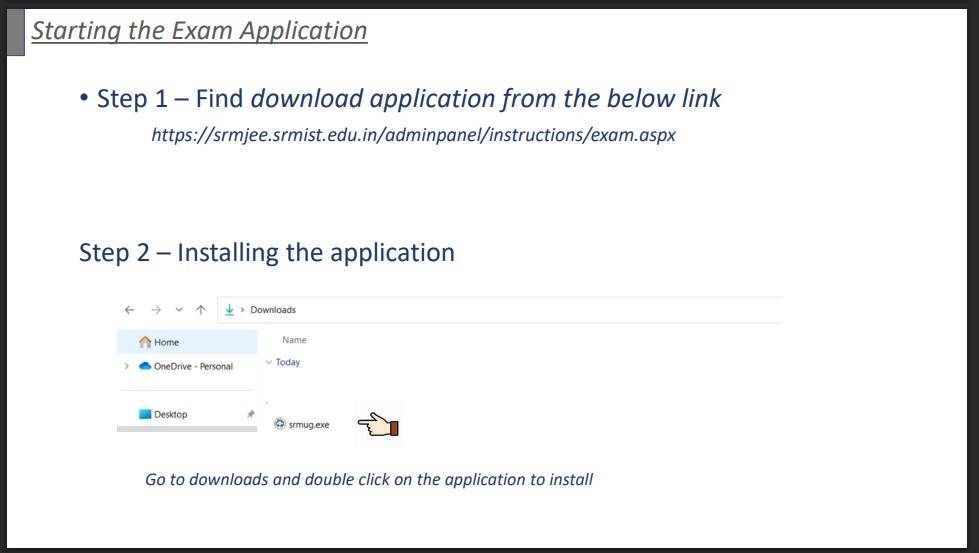
Step 2- Installing the application in system.
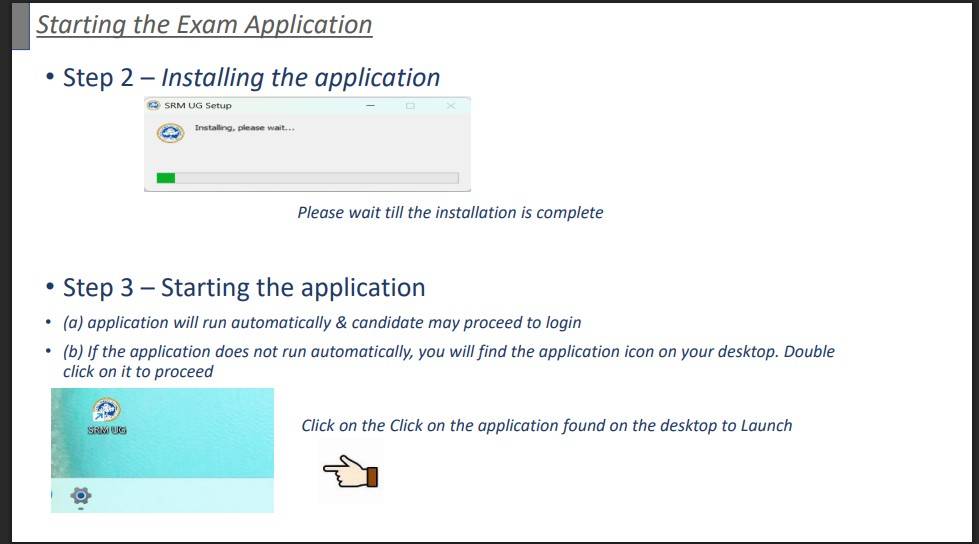
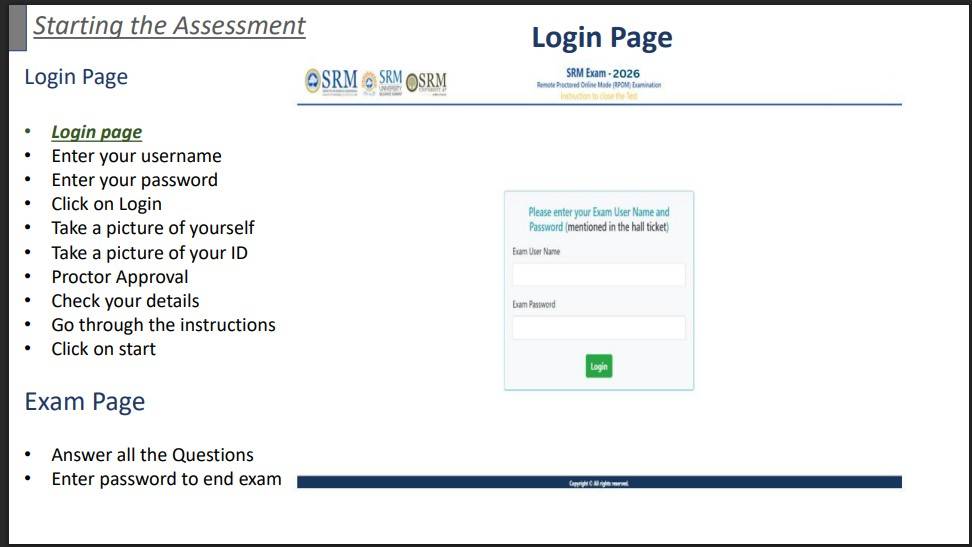
Step 3- Lgin using your credentials to start the exam. The username and password is mentioned on the SRMJEEE hall ticket.
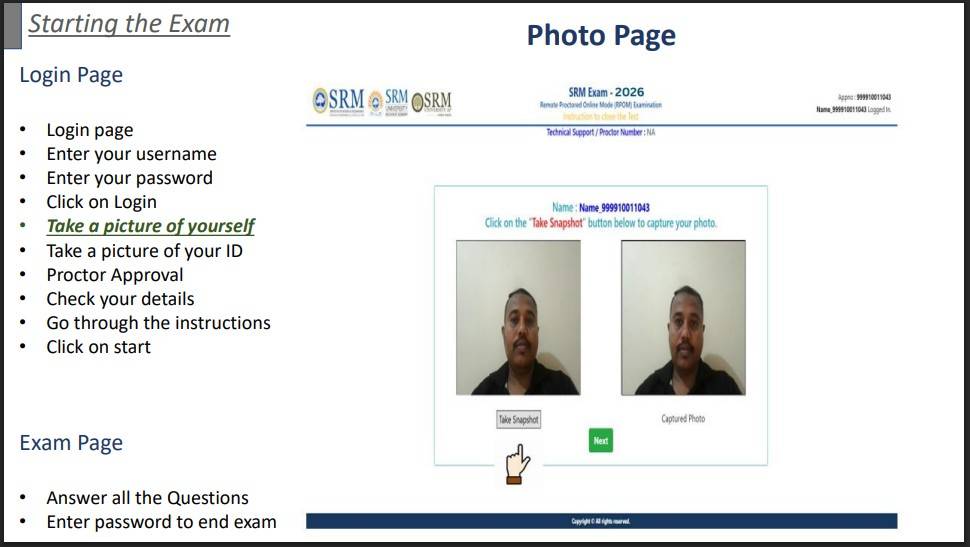
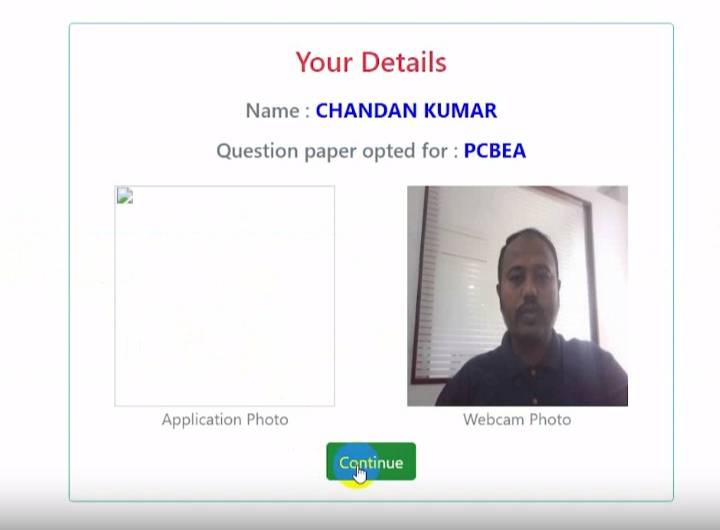
Step 4- After logging in capture you photo as shown in the figure.
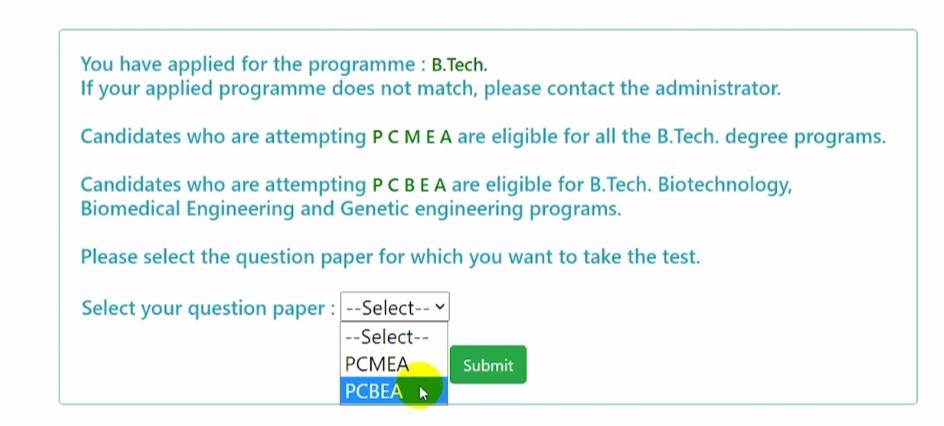
Step 5- Now select the question paper
Step 6- Click on continue to take exam.
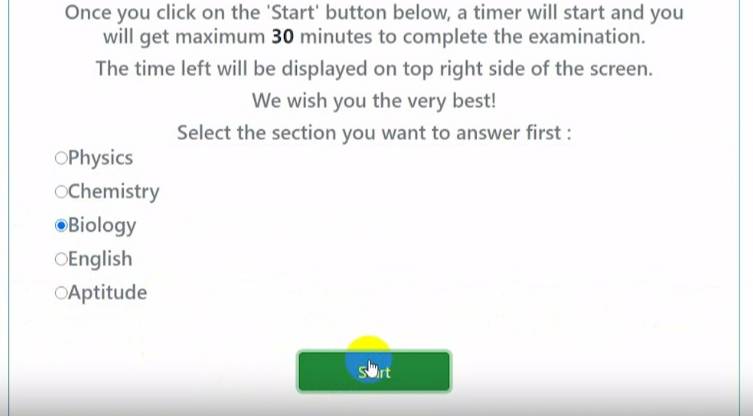
Read the instruction carefully and click on I Agree button. Question paper will display on the screen after pressing the agree button.

SRMJEEE 2027 Exam Day Guidelines
Students can appear for the SRMJEEE mock tests from their laptop or desktop. They can check SRMJEEE exam guidelines below.
Do's
- Ensure you have a computer in working condition with minimum specifications as mentioned here:
- Computer - Pentium IV/Dual Core, 1GB RAM or higher
- 80 GB HDD or higher
- 15″ colour Monitor, Keyboard, Mouse
- Microsoft Windows 10 and Antivirus
- Webcam and microphone
- Internet connection of at least 1 MBPS along with a private room without external noise and disturbance
- Place computer on a table, with your back facing the wall.
- Ensure there are no devices placed in background.
- The room must be quiet, with no background noise and only the student must be present, for the entire duration of the entrance exam.
- Keep computer table, clear of any objects, paper, books and any other electronic material like Mobile phones, tablets, laptops etc.
- Ensure proper lighting (no backlight) so that your face is visible on the webcam.
- Ensure that you are dressed formally
- You are advised to tie your hair in case you are having long hairs
Dont’s
- Avoid taking help from others during the test
- Bluetooth devices are prohibited
- Do not use Mobile restricted during test
- Do not read out anything loudly.
- You can not leave the system during test.
- Avoid wearing glare glasses when taking test.
- Do not play the radio/TV/ Music in background.
- Do'nt look to left, right or top when taking test.
- You must not allow anyone to enter room during test.
Read More:
Explore more B.Tech exams with upcoming dates

28 Sep '26
1 Jun '26 - 30 Sep '26
30 Sep '26
3 Oct '26
24 Oct '26
JEE Main

1 Nov '26 - 30 Nov '26
1 Nov '26 - 30 Nov '26
18 Dec '26
21 Sep '26 - 2 Dec '26
Explore popular B.Tech colleges for you
Want better recommendations?
There is a 90% more chance of getting best college recommendations by sharing preferences.
- Chat with our counselor
- Get your personalised list of colleges & exams matching your preferences

Commonly asked questions
SRMJEEE is held in online proctored mode. This means candidates can take the exams from their homes and they do not have to visit any exam center for taking the exam. Proctored exams are timed exams that you take while proctoring software monitors your computer's desktop, webcam video and audio. In Proctored Online Exam, you will be under constant observation during the entire duration of the test via artificial intelligence tools and live monitoring by the proctors. Any suspected activity will lead to the immediate termination of exam. The AI tools will be able to detect any movement of face or eyeballs and highlight the same automatically. Thus, the candidate will be under constant vigilance of proctor through live feed to deter any suspicious activity of the candidate.
The total marks in SRMJEEE is revised from 125 to 130 marks and mode of the exam is online remote proctored.
SRMJEEE is an annual entrance test conducted by SRMIST to shortlist candidates for various technical and non-technical courses for its participating campuses. As per exam pattern, the test is held for a duration of 2 hours and 30 minutes. Candidates are awarded 1 mark for each correct answer. The question paper consist of 125 MCQs based on the syllabus of Class 11th and 12th for PCM/B and English & Aptitude.
News & Updates
Explore Other Exams
Oct '26 | AEEE 2027 Phase 2 Registration |
Nov '26 | AEEE 2027 Phase 1 Registration... |
Jun '26 | JoSAA 2026 starts |
1 Jun '26 | JEE Advanced 2026 Result Date |
29 Aug '26 | BITSAT 2026 Iteration-IX fee p... |
28 Aug '26 | BITSAT 2026 Iteration-IX Annou... |
Oct '26 | JEE Main 2027 Registration Ses... |
Dec '26 | JEE Main 2027 Correction Windo... |
1 Sep '26 | COMEDK 2026 Counselling: Round... |
1 Sep '26 - 3 Sep '26 | COMEDK 2026 Counselling: Round... |
Oct '26 | VITEEE 2027 Registration Start... |
Apr '27 | VITEEE 2027 Mock Test Release ... |
Student Forum
 Anything you would want to ask experts?
Answered a week ago
No, there is no negative marking in SRMJEEE PG 2027. A total of 100 questions are asked, each carrying one mark.
A
Contributor-Level 8
Answered a week ago
The syllabus of SRMJEEE PG and GATE is same, but the questions asked in SRMJEEE PG are moderate level. Most questions are basic and direct formula-based.
B
Contributor-Level 8
Engineering Education & Entrance Exam Expert
Role: Senior News Writer & Content Editor, Shiksha.com
Education: B.Tech in Mechanical Engineering [IET], MA Education Philosophy
Satyendra Singh is an Engineering gradua
Read Full Bio