
CAT Registration 2026 Last Date (Over): Form Correction (Oct 5), Fees & Process
Common Admission Test 2026 ( CAT )


CAT Form Correction
5 Oct '26 - 6 Oct '26


CAT Registration 2026: IIM Indore has announced the CAT form correction dates 2026. According to the notifiction released today, the CAT application form correction window will open on October 5, 2026. Candidates will be able to edit photo, signature and test city options until Octoer 6, 2026.
CAT 2026 registration window was open from August 3 to September 22, 2026.
A total of 22 IIMs and 1,700+ other B-schools across India accept the exam scores for MBA admissions. IIM Indore, the conducting body of Common Admission Test (CAT) 2026, will administer the exam for all applicants on November 29 across 170 test cities.
- CAT 2026 registration fee: As per the official notification, General, EWS, and NC-OBC candidates had to pay INR 2,700, whereas SC, ST, and PwD candidates have to pay INR 1,350.
- CAT 2026 eligibility: A bachelor's degree with at least 50 per cent aggregate marks (45 per cent for reserved categories). Final-year students can also register.
Find complete details on CAT registration 2026, including the step-by-step application process, documents required, photo and signature upload specifications, category certificate formats, and how to select preferred exam cities.
- CAT Form Correction 2026: How to Edit Application Form
- CAT 2026 Registration Link
- CAT 2026 Registration Dates
- CAT 2026 Registration Highlights
- Eligbility Criteria for CAT Registration 2026
- How to Register for CAT 2026?
- CAT 2026 Registration Fee
- Documents Required for CAT Application Form 2026
- CAT 2026 Photo and Signature Specifications
- Common CAT Registration Problems and Solutions
- FAQs on CAT Application Form 2026


CAT Form Correction 2026: How to Edit Application Form
In CAT form correction process, candidates will have the option to upload better photograph and image of their signature in the CAT form or change the test city preference. No other section will be editable. Check the process of CAT 2026 form correction below:
- Log on to CAT 2026 website: iimcat.ac.in
- Click on ‘login’ tab
- Enter User ID and password
- Click on Application Form
- Go to relevant section (photo, signature, test city) and make changes
- Enter CAPTCHA code and click on continue to complete the process
Real prep plan shared by CAT toppers who scored 99.9+ to 100 percentile:
- 2025 CAT Topper Anmol Gupta (99.96%): Solved 5 DILR sets in under 35 mins.
- 2024 CAT Topper Vagish Nangia (100%): Mastered VARC using a 7-8 min RC drill and prioritised sectional mocks.
- 2025 CAT Topper Pranshav Shah (99.80%): Followed daily timed routine of 4 RCs, 4 DILR sets, 30-40 Quant questions.
CAT 2026 Registration Link
IIM Indore will close CAT registration fee payment window. Candidates who have completed the online registration must visit the official website to access login link to pay the registration fee. The space below mentions direct link for CAT application fee payment 2026:
Official Links for CAT Registration 2026
- Candidate Login to CAT Pay Application Fee: https://cdn.digialm.com/EForms/configuredHtml/32842/101262/login.html (Closed)

CAT 2026 Registration Dates
Candidates can check the CAT registration dates table below to see upcoming events, including the CAT admit card release date.
| IIM CAT Exam Event | CAT Registration Dates 2026 |
|---|---|
| CAT notification date | 25-Jul-2026 |
| CAT registration start date and time | 03-Aug-2026 (10 AM) |
| IIMCAT registration end date and time | 22-Sep-2026 (5 PM) - extended deadline |
| Last date for CAT registration fee payment | 24-Sep-2026 (5 PM) |
| CAT correction window | First week of October 2026 (tentative) |
| CAT admit card issuance for all applicants | 04-Nov-2026 |
| CAT exam date 2026 | 29-Nov-2026 |
Also Check: CAT 2026 Dates
CAT Registration 2026 Last Date
IIM Indore has closed the CAT 2026 registration fee payment window. Candidates were able to use the login link to pay CAT exam fee until September 24, 5 PM. CAT registration last date for new registration was September 22. Candidates were allowed to fill and submit the CAT 2026 exam form by visiting the official website, iimcat.ac.in.
CAT Application Form Correction Timeline
Candidates who fill and submit the CAT exam form before the last date will be able to access the form correction window. The conducting IIM does not notify the CAT form correction dates beforehand. Based on previous year trends, candidates will find CAT application form correction link in the first week of October. Candidates will be allowed to access the CAT form correction window to make changes in the selected details filled in the exam form.
CAT form correction link remains active for three to four days on the official website, iimcat.ac.in
CAT 2026 Registration Highlights
The table below indicates CAT registration highlights 2026:
| CAT Registration Highlights | CAT Registration Details |
|---|---|
| Conducting IIM | IIM Indore |
| Registration website | iimcat.ac.in |
| Application mode | Online |
| CAT exam form cost | INR 2700 (Unreserved) INR 1350 (Reserved) |
| Number of IIM programme preferences | 70+ |
| Test city preferences | 5 |
| Exam Date | 29-Nov-2026 |
NOTE: Of the 170 test cities available for the CAT exam, candidates must choose a total of five preferences in order of priority.
- Preferred web browsers to fill CAT 2026 application form are Mozilla (version 134 to 151), Google Chrome (126 to 149) or Microsoft Edge (126 to 149).
- CAT 2026 application form is compatible with Android (version 4.0 and above) and iOS (version 11 and above).
Eligbility Criteria for CAT Registration 2026
Candidates applying for the exam must know who can apply for CAT. Only eligible candidates are allowed to appear for the CAT 2026 exam. Check CAT registration eligibility 2026 below:
- Candidates must have a minimum aggregate score of 50 per cent (45 per cent for reserved categories) in the qualifying degree exam.
- Candidates with CA/CS/CMA designation are eligible, irrespective of qualifying degree status.
Candidates need to furnish the document proofs for their qualifications at the time of admission. Therefore, candidates must check complete details on CAT eligibility criteria before applying for the MBA exam.
Can Final-Year Students Register for CAT 2026?
There is no restriction for final-year candidates to apply for the CAT 2026 exam. Such candidates can apply for CAT exam provisionally.
For admissions, candidates who are waiting for the final year results can also join the IIM courses provisionally, if they submit a certificate from the Principal/Registrar of their University/Institution (issued on or before the stipulated date by the respective IIM). The certificate must state that they have completed all the requirements for obtaining the Bachelor’s degree on the date of issue of the certificate.
Can Working Professionals Apply for CAT 2026?
Work experience is not mandatory to apply for the CAT 2026 exam. Candidates can apply for the Common Admission Test, irrespective of their employment status.
Candidates who want their work experience to be considered during CAT registration must have eligible full-time work experience. Relevant work experience is considered by some IIMs while shortlisting for final admissions.
Also Check:
- CAT 2026 Eligibility for Working Professionals: Rules, Criteria & Proof
- CAT 2026 Eligibility for Engineering Graduates
How to Register for CAT 2026?
CAT application process includes registration, entering personal and academic details, uploading documents, selecting programmes and test cities, and paying the application fee. Applications for CAT exam can be fiilled at the official website, iimcat.ac.in. No other website hosts a direct link of CAT form. Check complete details on how to apply for CAT exam below:
Step 1: Register for CAT 2026
- Visit the official CAT website and click on Register under the New Candidate Registration section.
- Enter the candidate's name as mentioned on the Class 10/SSC certificate.
- Enter the date of birth, email address, country and mobile number.
- Click on Generate OTP.
- Enter the CAPTCHA and submit it to receive the OTP.
- Enter the OTP received on the registered mobile number and click on Validate the OTP.
- Read the declaration, select I Agree, enter the CAPTCHA and click on Confirm.
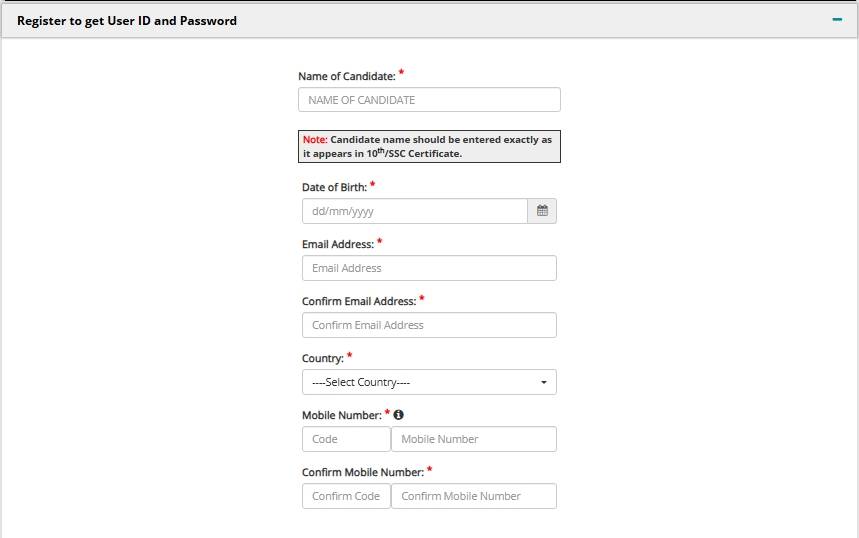
CAT registration screen where candidates enter their basic details and generate an OTP for verification.
Important: Candidates should use an active personal email ID and mobile number. The name, date of birth, email address and mobile number entered during registration cannot be changed after submission.
Step 2: IIM CAT Login for Online Registration
- Check the registered email ID and mobile number for the system-generated User ID and Password.
- Visit the CAT website and click on Login under Registered Candidate Login.
- Enter the User ID, Password and CAPTCHA.
- Click on Login.
- Check the details shown on the Applicant Details page.
- Click on Go to Application to start filling the CAT application form.
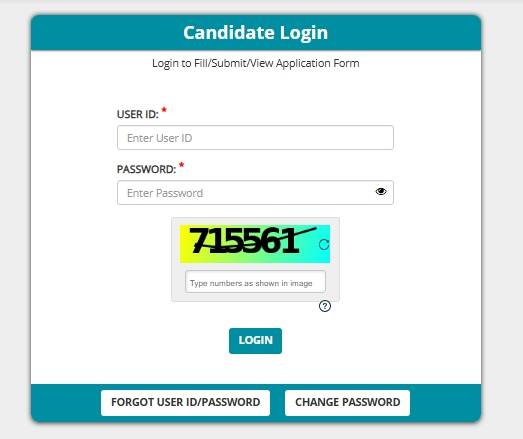
Candidate dashboard where registered users can log in and open the CAT application form.
Step 3: Filling Personal Details and Uploading Documents in CAT Application Form
In this section, candidates have to enter their personal, category, disability and address details. The following information is required:
- Candidate's name and date of birth
- Father's/Guardian's name and Mother's/Guardian's name
- Spouse's name, if applicable
- Gender and nationality
- Category details
- PwBD status, if applicable
- Communication and permanent address
- Alternate email address
- Emergency contact details
NOTE:
- Candidates belonging to reserved categories have to enter the required certificate details, including the certificate issue date, serial/entry number, state/UT and caste/tribe name.
- Candidates applying under the PwBD category have to provide the required disability details, including the percentage of disability, PwD UDID number, PwBD category and details related to wheelchair support and scribe requirement, wherever applicable.
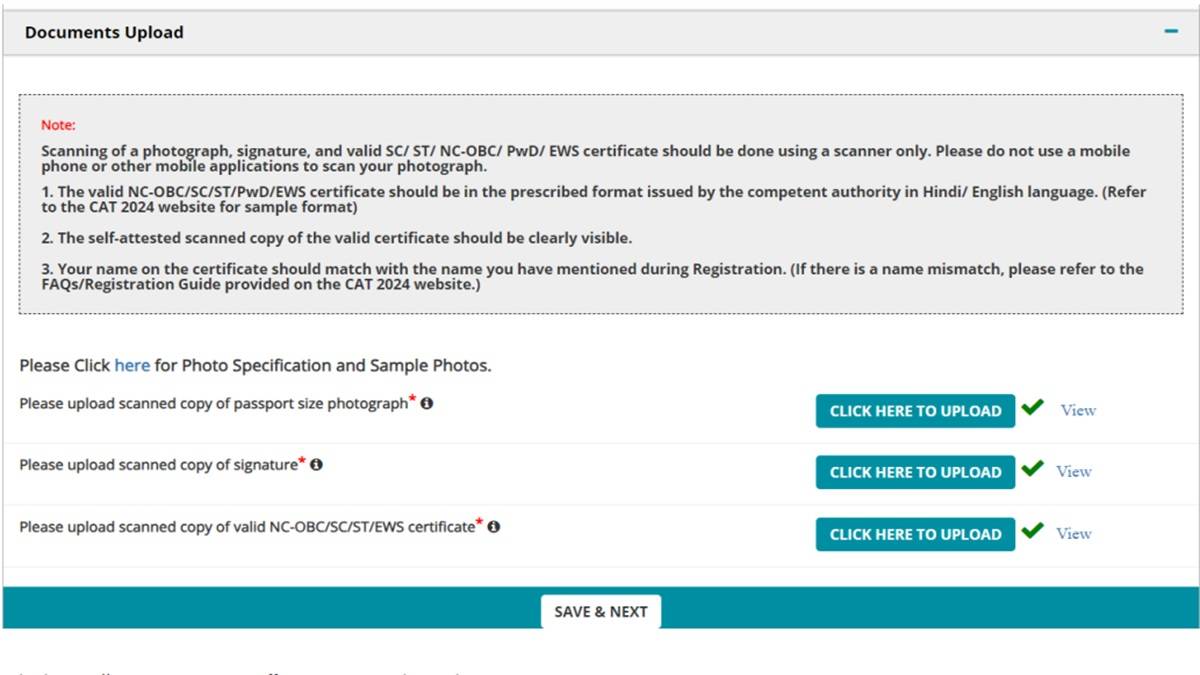
Upload Photograph and Signature
- Photograph: Upload a recent passport-size photograph in JPEG format. The photograph should be 1200 × 1200 pixels and should not exceed 80 KB.
- Signature: Upload the scanned signature in JPEG format with dimensions of 80 mm × 35 mm and a maximum file size of 80 KB.
- Upload the applicable category or disability certificate in PDF format, wherever required.
After entering all the details and uploading the documents, click on Save & Next.
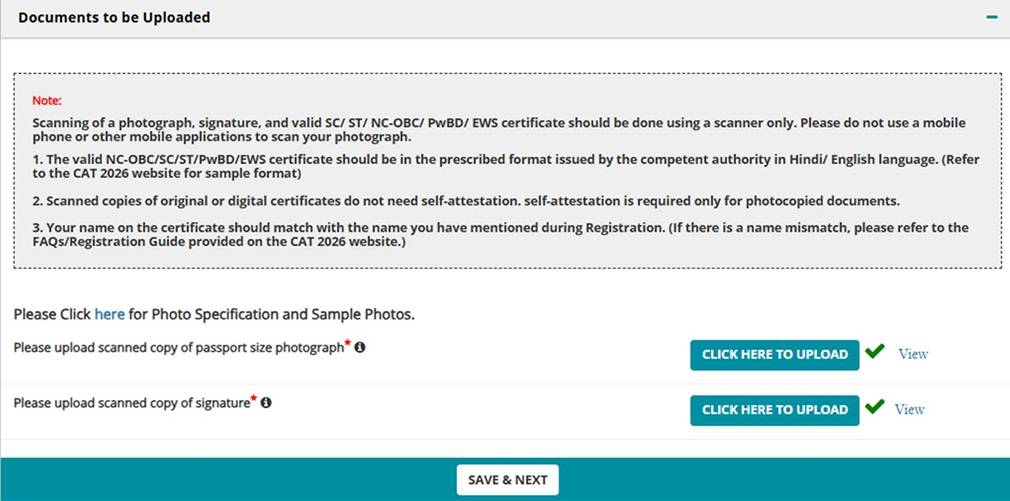
Personal details document upload section where candidates enter their personal and address information and upload their photograph, signature and applicable certificates.
Note: NC-OBC and EWS certificates should be valid and issued on or after April 1, 2026. If the latest certificate is under renewal, candidates should upload the previous certificate along with the required undertaking available on the CAT portal.
Step 4: Enter Academic Details during CAT Registration 2026
Candidates have to enter their Class 10, Class 12 or Diploma, Bachelor's degree and other applicable academic details.
Class 10 Details
- Select the Class 10/SSC/equivalent board.
- Enter the month and year of completion.
- Enter the maximum marks and total marks obtained in all subjects.
- The aggregate percentage will be calculated based on the details entered.
Class 12 or Diploma Details
- Select whether the qualification is Class 12/equivalent or a Diploma.
- Enter the board name, month and year of completion and discipline.
- Enter the maximum marks and total marks obtained.
- Check the aggregate percentage.
Bachelor's Degree Details
- Select whether the candidate is currently in the final year of the Bachelor's degree or has completed the degree.
- Enter the total duration of the degree.
- Enter the type of university/institution, state/UT, university/institute name and college name.
- Enter the degree name, discipline and graduation stream.
- Enter the month and year of commencement and completion.
- Enter the aggregate marks or percentage.
After completing the academic details, click on Save & Next.
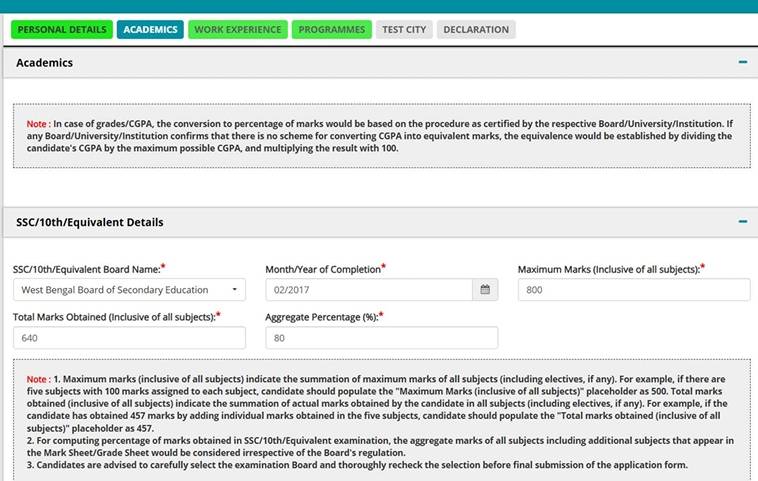
The Academics section where candidates enter their marks, qualification details and graduation information.
Things to Keep in Mind:
- While entering Class 10 and Class 12 marks, candidates should enter marks for all subjects mentioned on the mark sheet, irrespective of the subjects considered by the board for calculating the passing percentage.
- If the candidate has another Bachelor's degree, select the option indicating that they are currently in the final year of or have completed another Bachelor's degree and enter the required details.
- Master's degree and professional qualification details can also be entered, wherever applicable. Professional qualifications include CA, CS, ICWA/CMA and FIAI.
Step 5: Enter Work Experience
Candidates have to enter their full-time, post-graduation work experience in completed days up to July 31, 2026.
- Enter the total number of completed days of eligible work experience.
- Enter the number of days of break in work experience, if applicable.
- Enter 0 if there is no break in work experience.
- Click on Save & Next.
Note: Part-time jobs, internships, articleship, academic projects and work experience gained before graduation are not counted as valid work experience.
Step 6: Select Programmes and Interview Cities
Candidates can select the management programmes offered by the participating IIMs from the programme selection section.
- Select Select All to apply for all available programmes without paying additional application charges.
- Candidates can also select individual programmes using the respective checkboxes.
- Select Interview City 1 and Interview City 2 for each selected programme.
- Click on Save & Next.
Step 7: Select CAT Test Cities
Candidates have to select five different test cities in order of preference. These five cities can be chosen from the list fo 170 test cities for CAT exam.
- Select the first preferred test city.
- Select four more cities in order of preference.
- Make sure that the same city is not selected more than once.
- Click on Save & Next.
Also Read: CAT Test Cities and Exam Centres
Important: The test city and exam slot are allotted after the registration process closes, based on the availability of test centres. The allotted test centre and session will be mentioned on the CAT admit card.
Step 8: Reviewing CAT Application Form Details before Submitting
Before making the payment, candidates should check the complete application form and verify all the details entered.
- Click on Preview and check the application form.
- Verify the personal details, academic information, work experience, programme choices, test city preferences and uploaded documents.
- Select the checkbox confirming that the application form has been reviewed and the details are correct.
Step 9: Payment of CAT Registration Fee 2026
Candidates can pay the application fee using a credit card, debit card, NetBanking, UPI or wallet. After successful payment, save the Payment Transaction Number and payment confirmation.
- Select the checkbox agreeing to the terms and conditions of the online payment facility.
- Enter the CAPTCHA.
- Click on Submit to proceed to the BillDesk payment gateway.
Candidates should log in again and open the Download Application tab to download and save the completed CAT application form.
Important: Candidates cannot make changes to the application form after the fee has been paid and the form has been submitted. Check all details before making the payment.
CAT 2026 Registration Fee
CAT exam fee is to be paid at the time of form submission. Candidates can register first and pay the fee later too, but their form will not be accepted until the fee is paid. CAT application fee remains the same irrespective of the number of IIM courses selected by the candidate. Check below the latest CAT registration fee.
| Category |
CAT Exam Fee |
|---|---|
| CAT registration fee for General, EWS and NC-OBC |
INR 2,700 |
| CAT application fee for SC, ST and PwD |
INR 1,350 |
Source: CAT Information Bulletin 2026
CAT Payment Methods for Application Fee
CAT registration fee payment partner is BillDesk. Candidates can pay CAT 2026 registration fee online using any of the following mediums:
- Debit Card
- Credit Card
- UPI
- E-wallet
CAT registration fee is non-refundable. Therefore, candidates must ensure eligibility and details filled in the form before completing the payment.
Documents Required for CAT Application Form 2026
CAT 2026 Photo and Signature Specifications
Common CAT Registration Problems and Solutions
FAQs on CAT Application Form 2026
The CAT form correction window usually opens for 2-3 days. Typically, it opens a day after the last date of CAT registration.
Candidates can select up to 21 IIMs in CAT application form for PI shortlist and admission. There is no cap on selecting campuses. Candidates must however, make an informed choice but first checking CAT cut off, course specialisation and fee of all IIMs and basis that select campuses in the CAT application form. It is best to choose a combination of top IIMs and newer IIMs so that you have wider options for admission.
CAT 2026 registration and application link will be available at iimcat.ac.in website. Candidates will have to apply for the exam by visiting the exam website.
There is no age limit to appear for CAT. The CAT exam is open for fresh graduates as well as working professionals. Since CAT is accepted by over 1300 B-schools across India for their full-time as well as executive MBA or online professional courses, a lot of working professionals appear for the CAT to pursue such courses. CAT score is accepted by Iims for full time MBA, executive MBA and FPM programmes.
Other top MBA colleges in India also shortlist candidates for executive MBA or part-time MBA on the basis of CAT score. The minimum age limit for has to be 20 years as the minimum qualification for CAT exam graduation. Any candidate who has completed Graduation with 50 per cent aggregate (45 per cent for SC/ST candidates).
Any candidate in final year of Bachelor's degree course can appear in CAT exam. Any candidate having a professional degree like CA/CS/ICWAI with a minimum of 50 per cent in aggregate.
There is no option to pay the fee of CAT 2026 application form in cash. The only mode of fee payment is online which includes debit card, credit card, net banking, UPI.
The following steps are involved in filling CAT application form:
· Registration and creating a login
· Filling basic details
· Filling academic details
· Filling work experience
· Uploading image and signature
· Selecting IIMs and courses
· Selecting test cities
· Fee payment
CAT 2026 application form will be released in the first week of August 2026. CAT 2026 registration dates will be announced in the last week of July through an official notification.
CAT application fee is INR 2700 for General candidates and INR 1350 for SC/ST/PwD candidates. The fee amount is to be paid online at the time of application form submission.
Yes, you are eligible to appear for the exam provided your score in the first two years of the degree course is above 50% (or equivalent). In case you belong to SSC/ST/PwD categories, the minimum aggregate should be 45%. Candidates planning to pursue MBA must make sure that they score minimum of 50 per cent in aggregate in every year of their Bachelor's degree programme, so that overall average too is 50 per cent. Those, in the final year of graduation must take care that if they do not have a minimum of 50 per cent in first two years, they need to score much higher in the final year so that their overall score meets the minimum requirement. To have a better chance of being selected by the Iims, candidates must aim for high scores in graduation and not just 50 per cent as academic record is a significant contributor in shortlisting of candidates for admission.
Unlike other MBA entrance exams such as SNAP and XAT, there is no extra charge for selecting IIMs in the CAT application form. For overall CAT application form you will need to pay only INR 2500 (INR 1250 for SC/ST/PWD candidates). You can select as many IIM campuses, and courses as you want to.
No, you are not eligible to apply for CAT exam until you complete your CA course and clear ICAI CA exams. In case of absence of graduation degree, candidates are required to complete the professional degree before applying. The minimum score for applying for CAT on the basis of professional degree course in 50 per cent ( 45 per cent for SC/ST/PwD candidates).
Candidates need the following documents while filling the CAT application form:
- A recent passport size photo (color against white background)
- Scanned signature with black pen on white paper
- Any photo ID card like PAN card, Aadhaar Card, Voter ID, Passport
- Class 10 marksheet
- Class 12 marksheet
- Graduation marksheet
- Permanent address proof
- Work experience documents Reserved category students need to upload Category Certificate along with the CAT application form. The Certificate is available on the CAT website. Candidates can download, fill it, get it attested by competent authority and upload it as PDF with the CAT application form.
- The PwD category students also have to fill the PwD form and Scribe affidavit along with the exam application form. This is necessary for getting scribe facility and PwD facility at the test centre. The CAT application form is same for students from all categories. Those belonging to a particular category (SC/ST/PwD) will be required to mention it in the relevant field of the CAT form.
Explore top MBA/PGDM exams
Oct '26 | CMAT 2027 registration and app... |
7 Feb '27 | CMAT 2027 exam |
28 Sep '26 - 7 Oct '26 | KEA PGCET 2026 Round 1 Counsel... |
28 Sep '26 - 7 Oct '26 | Karnataka PGCET 2026: Fee Paym... |
14 Dec '26 | MAT December 2026 PBT Registra... |
17 Dec '26 | MAT December 2026 PBT admit ca... |
16 Jan '26 - 23 Jan '26 | IGNOU TEE Dec Result |
1 Dec '25 - 14 Jan '26 | IGNOU TEE Dec 2025 exam |
10 Sep '26 - 14 Sep '26 | AP ICET 2026 Phase 1 Self Repo... |
9 Sep '26 | AP ICET 2026 Phase 1 Seat Allo... |
21 Aug '26 - 25 Nov '26 | SNAP 2026 Registration Process |
7 Dec '26 | SNAP 2026 admit card session 1... |
Dec '26 | CUET PG 2027 Exam Notification |
Dec '26 | CUET PG 2027 Application Proce... |
Apr '27 | MAH CET 2027 First Attempt |
May '27 | MAH CET 2027 Second Attempt |
20 Aug '26 - 10 Oct '26 | NMAT 2026 Registration Window |
20 Aug '26 - 22 Oct '26 | NMAT 2026 Scheduling Window |
18 Dec '26 | NTA CSIR NET December 2025 Exa... |
Jul '26 | NTA AIAPGET 2026 Exam Date |
12 Aug '26 | Supplementary counselling at G... |
11 Aug '26 | Supplementary counselling at G... |
15 Jul '26 - 6 Dec '26 | XAT 2027 Registration |
Oct '26 | XAT 2027 Form Correction |
Dec '26 | SRCC GBO Registration 2027 |
Feb '27 | SRCC GBO 2027 Admit Card Relea... |
14 Jan '27 - 31 Jan '27 | OJEE 2027 registrations |
22 Apr '27 - 30 Apr '27 | OJEE 2027 Admit Card Release |
18 Jun '26 - 1 Dec '26 | IBSAT 2026 Registration Test 1... |
24 Oct '26 | IBSAT 2026 Mock Test |
31 Oct '26 | Last Date for submitting Quali... |
6 Jun '26 - 13 Jun '26 | JMI Entrance Exam 2026 Counsel... |
31 Aug '26 - 3 Sep '26 | TG ICET Spot Admission at Ins... |
24 Aug '26 | Release of TGICET 2026 Spot Co... |
Feb '27 | JET 2027 registration start |
2 May '26 | JET 2026 PG - Online PI |
27 Sep '25 | PGRRCDE 2025 Exam Date |
3 Sep '25 - 25 Sep '25 | PGRRCDE Entrance Test 2024 App... |
 4.6
4.6
 NMAT 2026 Registration Window 20 Aug '26 - 10 Oct '26